The Main menu offers the same functions as the Home menu as well as functions for help and language switching.

You can open the Main menu by clicking on the camera symbol. The additional functions are:
Help
Opens a dialog where you can select further options:
-
Support: here you will find the iba customer support and contact details for the subsidiaries worldwide.
-
Save information for iba support...: this command creates a support file containing information for the iba support. In general, iba recommends sending a current support file to the support desk when a problem occurs.
-
Clicking the command opens a dialog where you can configure the content of the support file.
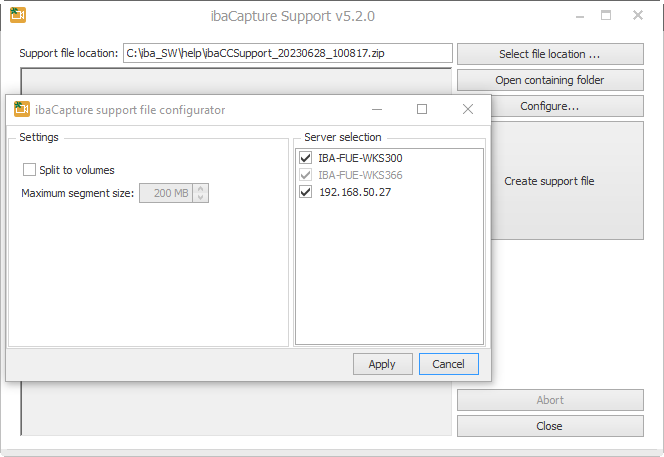
You can select the storage location of the file and open the specified directory. The <Configure> button opens a dialog where you can select the ibaCapture Server to which ibaCapture Manager is connected and for which you want to create a support file.
The support file can also be split into multiple files if it is too large. You can specify the maximum size of the files in the Maximum segment size field.
-
Version history: This menu command opens an Internet browser with an HTML file where you can read the history of the different program versions.
-
Open ibaCapture Player log files location
-
Open ibaCapture Manager log files location
-
About...: Here you will find the necessary information about the current version of ibaCapture Manager.

Language
It is possible to switch the language of ibaCapture Manager. Select a language from the context menu. The menu offers all languages available in ibaCapture. Please note that some languages are only available with an additional language pack.
<Exit>
Closes ibaCapture Manager.