You can also use the report generator to present still images in a report.
Note |
|
|---|---|
 |
iba AG offers standard training courses for the ibaAnalyzer-Reportgenerator. You can find information on the training schedule our website, or you can contact your local iba representative. |
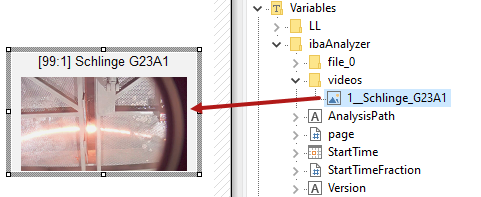
ibaAnalyzer exports each visible camera view to the variables list of the report generator into the "videos" folder.
-
In the Report Designer, drag the desired camera view from the tree into the layout window.
-
Position and scale it in the same way as the normal curve views.

Changing the video properties
If you want to change the properties of the camera image, double-click on the image.

Show video title
If you enable this option, the name of the source signal is displayed as the video title.
Frame
Enter an expression or a format from the ibaAnalyzer expression builder to use the video image relevant to this time. The time is relative to the start time of the oldest data open file in ibaAnalyzer.
Use alternative text overlay settings
If the camera view has an overlaid text, you can change the text settings here.