Problem
The display of video in ibaCapture requires system resources, including on the main processor (CPU). The following cases, for example, can lead to a significant load on a system when video is played in ibaCapture:
-
Simultaneous display of several video streams
-
Very high bit rate of individual streams (e.g. with high resolution or high frame rate)
-
Use of the HEVC/H.265 video codec
Remedy
These adjustments can be made to minimize the load as far as possible:
-
Make sure that the firmware of the cameras used is up to date (depending on the camera type).
-
Update the drivers for the graphics card on the PCs used.
-
Check whether hardware acceleration can be enabled on the PCs used:
-
Open the LAV Video Configuration application. In the Decoder to use selection, select DXVA2 (copy-back) or another compatible setting if necessary.
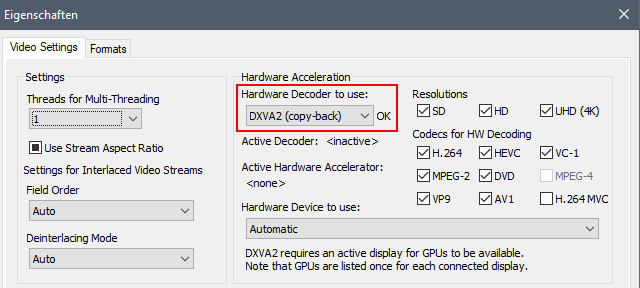
-
Then restart the iba applications used (ibaPDA Client, ibaCapture Manager).

Note |
|
|---|---|
 |
Avoid changes to the Threads for Multi-Threading value. Values greater than 1 cause problems during playback. |
More tips |
|
|---|---|
 |
|