It is also possible to add and configure the ibaW-750 device to the I/O Manager without connecting the device at the same time. With this offline option, it is possible, for example, to export a device and module configuration or to save the entire I/O configuration of the I/O Manager.
Note |
|
|---|---|
 |
For a detailed description, please refer to the current ibaPDA documentation. |
Proceed in the same way as when adding the device manually, with the exception that the terminals or the configuration cannot be automatically recognized and read out at the end, but must be added manually:

-
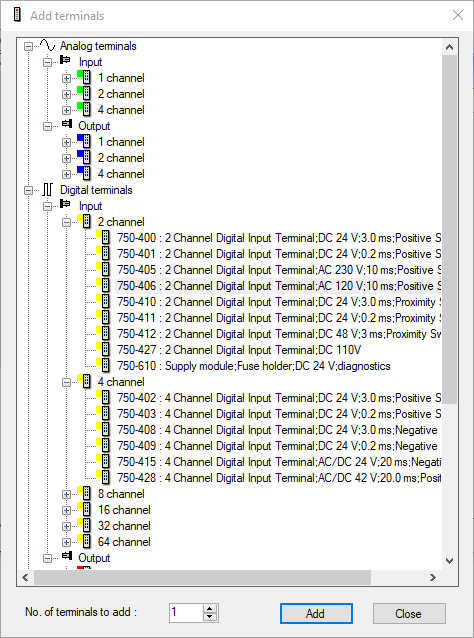
Select the "ibaW-750" module and click on the Click to add terminals... link.
The selection window for the terminals appears:
-
Select the relevant terminal and click <Add>.
Alternatively, you can double-click on the terminal.
The terminal is accepted without the selection window closing.
-
If a terminal is to be added several times, enter the desired number in the Number of terminals to be added field.
Note
If output terminals are connected, add them also in the described way. ibaPDA automatically adds the output terminals to an output module under Outputs at the appropriate link.
