If the ibaW-750 device is not to be operated in the same LAN as the ibaPDA computer, the device can also be added manually to the ibaNet-E interface in the I/O Manager.
Prerequisite: The ibaW-750 device must have been configured separately in advance. The configuration can be carried out in the same LAN or from another ibaPDA system. For information on configuration, see chapter Device settings.
-
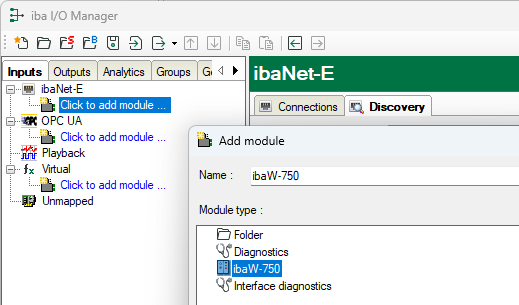
Click on the link Click to add module ....
-
Select the ibaW-750 module type.
-
For a successful connection, first enter the (network) address via which the ibaW-750 device can be reached.
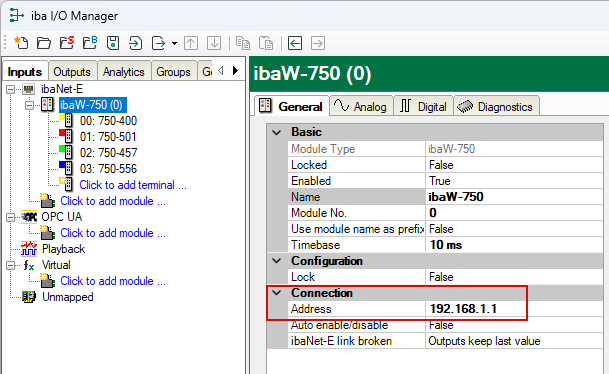
The address can either be a (fixed) IP address or the host name. The use of the host name is recommended if the device is located in a DHCP network in which the participants have not been assigned fixed IP addresses.
-
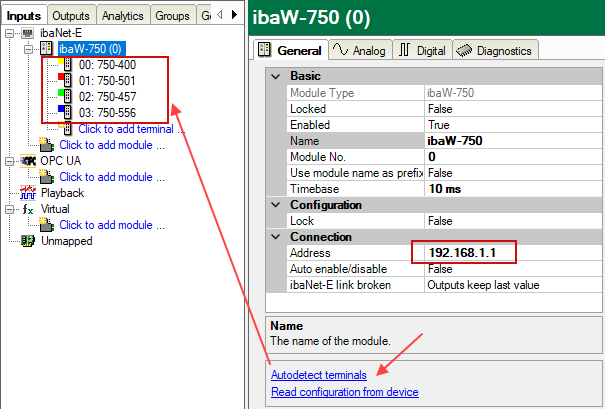
If the ibaW-750 device can be reached via the entered address in the network via Ethernet without restrictions, you now have the following options:
-
To add the connected terminals, click on the Automatically detect terminals link in the General tab.
-
To also read out the module configuration (if available), click on the Read configuration from the device link.
-


