In the Legend node, you define the display settings for the legend.

Select one of the following options for the legend content:
-
Signal name
-
Signal name and value with automatic formatting
-
Signal name and value with custom formatting
Enter the number of digits after the decimal point in the precision field. The width is the minimum number of characters displayed. Instead of spaces, leading zeros can be can be displayed.
-
Custom
You can enter text and dynamic content using parameters. When clicking in the input field, a tooltip appears with the possible parameters.
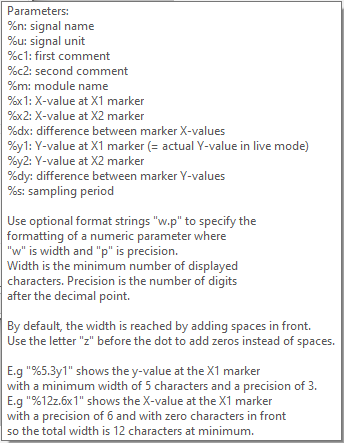
-
Text signal
Select a text signal. The text signal can contain regular text and legend parameters such as %c1, %x1 etc. You can use the same parameters as described in the Custom option.

Note |
|
|---|---|
 |
The HD trend graph supports ibaHD text signals. The offline trend graph supports ibaPDA and ibaHD text signals. |
You can select different display styles from the Style drop-down menu:
-
Transparent (transparent background)
-
Opaque (opacity adjustable)
-
Invisibile (legend is not visible)
The option Use this color for all digital signals in the legend enables a consistently readable legend for digital signals that are originally of different colors.
Tooltip
You can choose between displaying signal comments in the tooltip and user-defined content. The custom content is configured similarly to the custom legend.