Function
With the offline trend graph, signals from a closed data file (*.dat) can be displayed, as well as csv and txt files. All information fields included in the data file as well as the signal tree will be loaded. Besides, it is possible to load the files automatically or triggered in the offline display, e.g. each time a data file is completed. Now the user has the possibility to compare completed measurements with the current display. Not only time-based but also length-based signals can be displayed as data or text files parallel to the current recording.
The offline trend graph can also be used to display vector signals and traversing vectors. See also chapter Traversing vector.
Configuration
The offline trend graph behaves as a default trend graph, whereas data will be loaded from a file.
With a loadable sample file, the desired representation of signals can be configured via drag & drop from the signal tree.
The display consists of two parts. On the left, the signal tree of the currently loaded data file is displayed; on the right, the trend graph.

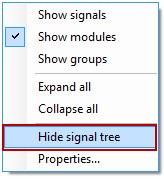
The signal tree can be shown or hidden via the context menu of the signal tree and the trend graph or via a button in the toolbar of the trend graph.

To load a file, open the properties dialog of the offline trend graph over the context menu.
