The trigger mechanism for setting up scenarios requires a user-defined ruleset. Each rule has its own trigger, layout, and camera configuration. When a certain rule-trigger releases, its proprietary layout will be loaded and thus its camera configuration will be applied.

Creating a rule
-
To create a rule, click at first on the branch Rules in the properties dialog structure.
-
Click on the <
 > button on the lower left of the dialog. The trigger editor (rule-trigger) dialog opens: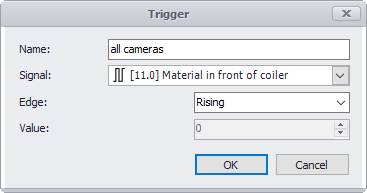
-
Give the trigger a comprehensive, application-specific name. If the name is omitted an automatic name will be generated.
-
Specify the trigger signal in the signal drop-down list. The trigger edge can be rising, falling or both. If the signal is analog, a trigger level value has to be entered.
-
Confirm the dialog with <OK> to add the trigger to the trigger list.
-
Leave the trigger selected and select the layout, which has to be activated, in the Layout drop-down list, which contains all defined layouts. On the right, the selected layout icon is displayed and the camera list is adjusted to the number of cameras in the layout. For every camera window, a camera signal and a camera command has to be configured:
-
In the Camera column, select the camera which should be used on this position.
-
In the Command column , click on the button <...> to open the command editor. The Camera command dialog is described below.
-
Activate the Key frames option to limit the video stream to key frames only in order to reduce the network load.

Camera command dialog

There are 3 types of camera commands:
Live
-
-
Sets the camera to live mode
-
Static offset
-
-
Sets the camera to replay mode at a preset playback speed and jumps back to the preset point in time before the trigger event. You can set the replay speed with the slider and define the time span in the respective field.
-
If the option Return to live mode after is enabled, the camera switches after the set time sequence from replay mode to live mode.
-
Replay trigger
-
-
Sets the camera to replay mode at the preset replay speed and jumps back. You can set whether the jump into the past is done by a fixed time period (Use a static offset) or controlled by an offset signal.
-
Define the replay trigger similar to the rule-trigger in the field Trigger.
-
Change to live mode as in the static offset mode.
-