General information about profiles can be found in the manual for ibaPDA, Part 5.
A special “Time/Length” profile type is available for an ibaQDR data store.
Before you configure the actual data store, you should create at least one suitable profile for the ibaQDR data store, so that you can assign the measurement signals later.
You assign the signals and profile later when configuring the measuring locations.
Adding a profile
Open the data store configuration and select the Profiles node in the top left.
Expand the <Add> button on the right of the dialog and select Time/Length.

You can now configure the profile properties.
Profile properties

Type
Shows the type with the appropriate store types (symbols)
Name
Enter an unambiguous and understandable name here.
Time-based, length-based
By enabling one of these options or both of them, you determine how the data is written to the data file.
For a time-based store, the settings are the same as for the “Time” profile.
For a length-based store, the settings are made accordingly. A length interval can be specified here instead of a time interval. The default setting is 1 m. You can enter both higher and lower values.
Tip |
|
|---|---|
 |
If you enable both store types, you will have advantages later when examining the data in ibaAnalyzer. You can then easily switch between a length-based and time-based representation. Particularly during commissioning and troubleshooting, comparing the time and length representations can be very useful. |
Filter
For both time-based and length-based stores, you can use filters.
-
None: The current value is stored (first sample).
-
Min, Max, Average: The corresponding calculated value is saved. The acquired values within a storage interval are used in the calculation. For length-based ibaQDR data, as there are normally a large number of “raw values” for a length interval (e.g. 1 m), the best approach should be considered carefully. It is also possible to define multiple profiles, each with different length intervals (see note below).
Note |
|
|---|---|
 |
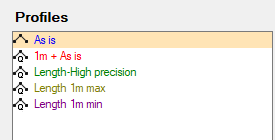
If you want to store Average, Max. and Min. values, you must first have made copies of the original measurement signals using the virtual signals. You can then assign each of these signals to a different profile, one for the average values, one for the maximums, and one for the minimums. Example:
|
Compression with precision
Here you can enter a value to achieve further compression of the stored data volume. If this option is enabled, a new measured value is only saved if it differs from the preceding measured value by more than the amount entered. This allows you to define a tolerance band for changes of values, e.g. to prevent “noise” from a measuring device unnecessary inflating the data file as long as the changes in value are within a reasonable range.
Note |
|
|---|---|
|
The value to be entered is an absolute value, which always relates to the scaling of the measurement signal to which the relevant profile is linked. If you want to use this option and assign different signals to this profile, make sure that the value entered is appropriate for all linked signals. For example, the value 1.0 may be appropriate for a temperature measurement (in °C) but not for a thickness measurement (in mm). |