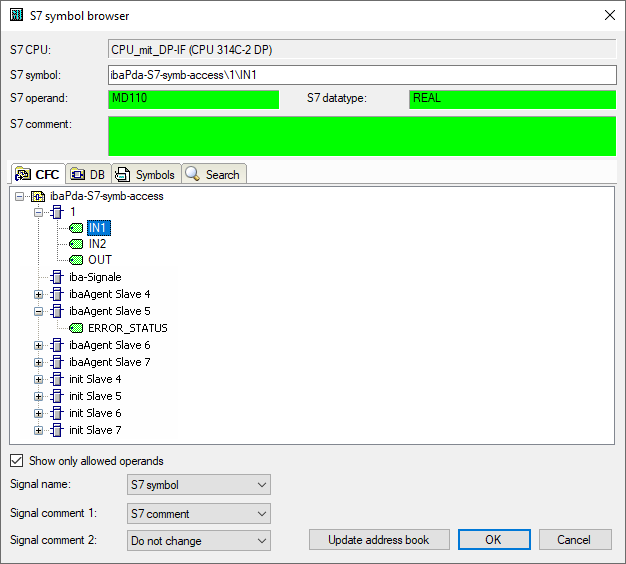
In order to select CFC connectors for the measurement, open the symbol browser first, see Selection via the symbolic operand addresses.
In the symbol browser, you open the CFC tab and select the signal. The connectors are listed hierarchically by chart name, module name and connector name:
Note |
|
|---|---|
 |
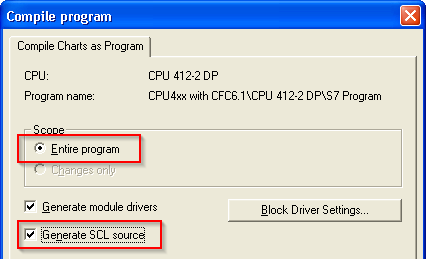
If no connectors are shown in the CFC tab, the SCL sources might not have been translated in the STEP 7 project. Activate the following options in the dialog for compiling the program in the SIMATIC software:
Afterwards, generate the address books again. |
Note |
|
|---|---|
|
When compiling a CFC program, DB addresses are assigned automatically in STEP 7 to the connectors. It may happen that other DB addresses are assigned to connectors, depending on the scope of the program changes that have been made between two compilation runs. In this case, also the address book for ibaPDA has to be generated again. The symbolically configured signals are automatically checked in the I/O Manager whereas the related absolute S7 operands are updated. |
Special function Drag & Drop
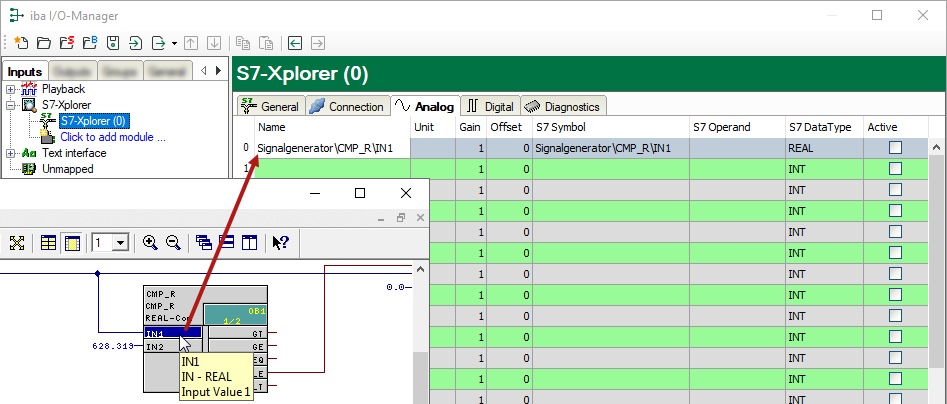
A convenient way to select signals is to drag & drop them from the CFC chart into the I/O Manager of ibaPDA.
-
Open the I/O Manager of ibaPDA and the signal table of the required module.
-
Start the CFC editor on the same computer as the ibaPDA client.
-
Drag the connector from the CFC editor into the desired line of the signal table in the I/O Manager of ibaPDA.
The CFC connector is now a measured signal in the signal table of the module.