For creating an address book, the S7 project has to be available. For the subsequent use, this is not necessary.
You create an address book using the S7 address book generator.
S7 address book generator
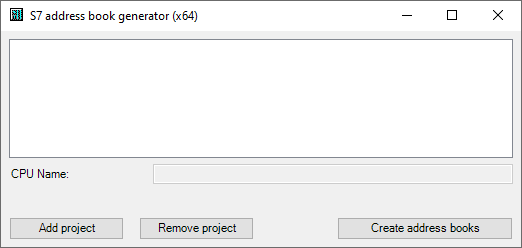
CPU Name
Name of the CPU
Step 7 HW Config export
A HW config export file can be selected as an option (useful when using an iba bus monitor in sniffer mode)
Comment language
Selection of the language that is to be imported for comment texts (only available for SIMATIC TIA portal projects)
<Add project>
Adds a new project to the list
Remove project>
Removes the marked project from the list
<Create address books>
Creates address books from the selected projects
Note |
|
|---|---|
 |
You can overwrite the entry in the CPU Name field. Thus, you can assign a unique name for the CPU that differs from that in the STEP 7 project. This is especially interesting when you use several STEP 7 projects in which the CPUs have the same name. |
Creating address books via the S7 address book generator
-
Open the S7 address book generator by one of the following ways:
-
On the General tab Address books node via the <Create address books> button
-
In the module configuration on the General tab under S7 – CPU Name: Select Create address book in the drop-down menu.

-
-
Click on the <Add project>.
-
Select a project file in the file browser
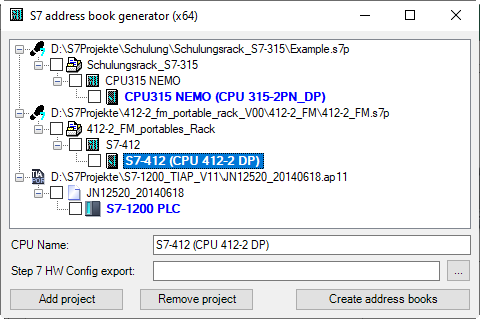
Now, the STEP 7 project with all configured CPUs is displayed.
-
Mark the CPUs you want to create the address books from and click on <Create address books>.
Note |
|
|---|---|
|
When address books of these projects are generated, TIA Portal projects must be compiled, saved and closed. |