The address books for SIMATIC S7 controllers are created and managed across modules. You can use one address book in more than one module.
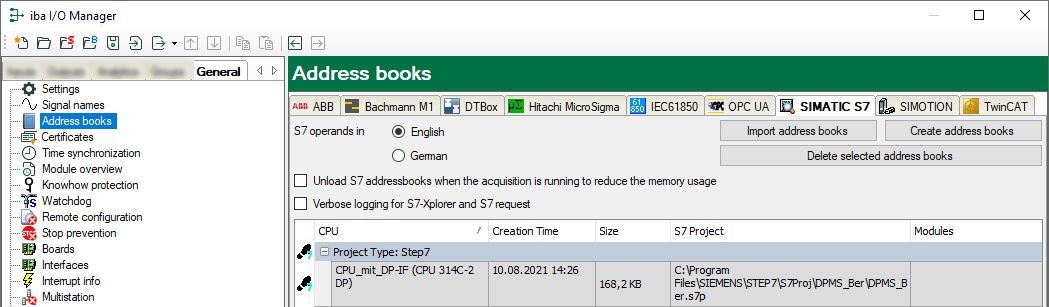
There are different types of address books for the different S7 project types:
-
 STEP 7: SIMATIC Manager project (not for S7-Xplorer modules with connection mode TCP/IP S7-1x00)
 -
 TIA Portal: TIA Portal Project
S7 operands in English/German
Here you can choose the language in which the S7 operands will later be available when browsing through the signal tables.
<Create address books>
This button opens the "S7 address book generator" dialog. You can select the source directory of an S7 project for creating the S7 address book. This can be a local or network drive.
<Import address books>
Import address books which are already available as ZIP files.
<Delete selected address books>
Delete address books from the ibaPDA server’s directory.
Unload S7 address book when the acquisition is running to reduce the memory usage
By enabling this option, the address book is outsourced to the hard disk during the acquisition in order to free up the main memory for the acquisition.
Table
List of all address books that are currently available in the system with name, creation date, path of STEP 7 project or IP address of the CPU in case of online generated address books and location where the address book is used.