The following configuration steps are required exclusively for accessing the subordinate control "PLC2" by the programming software TIA 7. For SINUMERIK, SINAMICS, or SIMOTION, you can apply similar steps. For using ibaPDA, these steps are not required.
-
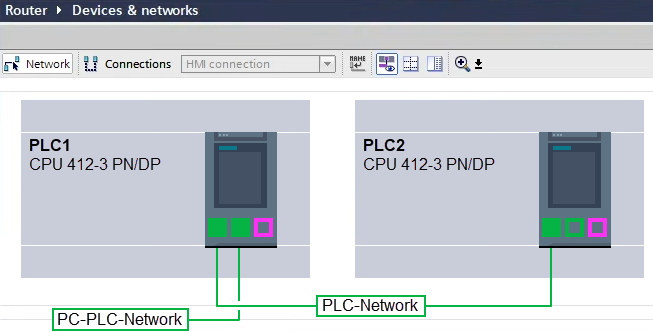
Connect both controllers in TIA Portal via the Ethernet ports.
-
Establish a connection with your computer and the first controller "PLC1" by adding a subnet.
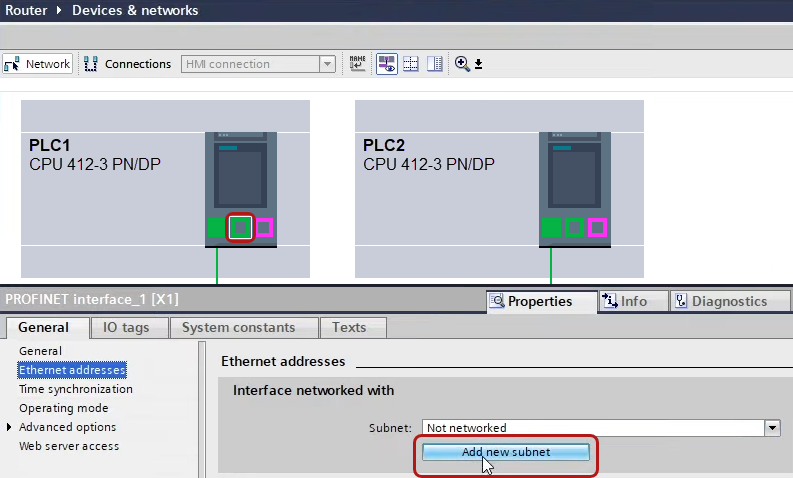
The connections between the controllers and to the computer are shown in TIA Portal.
-
Download the programming of the controller "PLC1" and then the programming of the controller "PLC2".
-
In the controller "PLC2", set the connection from "PLC1" to the computer as the connection to the interface/subnet.
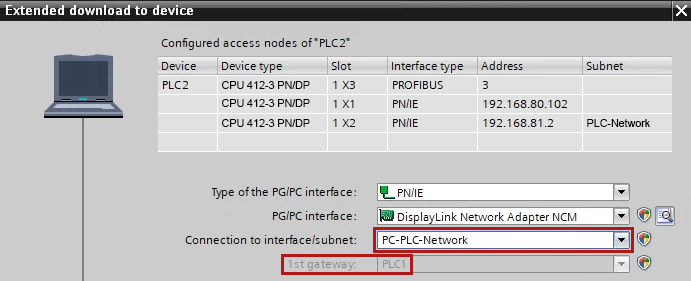
"PLC1" appears as the first gateway.
"PLC2" is now connected to the computer via S7 routing via "PLC1".