This section describes how to configure the Request blocks in TIA Portal STEP 7 for ibaBM-PN.
For each Request module
-
Copy the following blocks from the iba S7 library to the blocks folder of your STEP 7 project, see iba S7 library. One set of Request blocks has to be called for each Request module (connection) in ibaPDA.
-
ibaREQsym_M, see ibaREQsym_M
-
ibaREQsym_PN, see ibaREQsym_PN, or alternatively ibaREQsym_6PN, see ibaREQ3sym_6PN
-
ibaREQsym_DB_PDA
-
ibaREQsym_Interface (PLC data type)
Note

Only use Request blocks from the latest iba S7 library!
Request blocks in application examples can be outdated and, thus, cause errors.
-
-
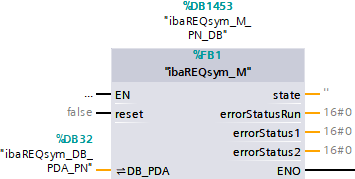
Call ibaREQsym_M within a cyclic interrupt OB (OB3x).
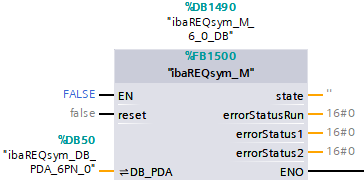
Alternatively when using ibaREQsym_6PN: Call ibaREQsym_M within a cyclic interrupt OB (OB3x).
-
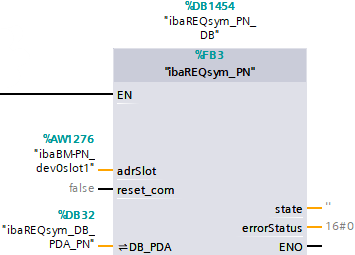
Call ibaREQsym_PN within the OB1 or a cyclic interrupt OB (OB3x).
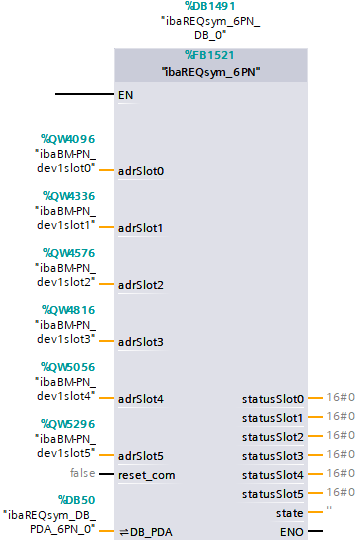
Alternatively when using ibaREQsym_6PN: Call ibaREQsym_6PN within a cyclic interrupt OB (OB3x).


For each additional Request module
-
In the blocks folder, an ibaREQsym_DB_PDA data block has to be available for each Request module. Copy the data block and assign a new unambiguous DB number.
-
Within OB1 or a cyclic interrupt OB (OB3x), ibaREQsym_M and ibaREQsym_PN (or ibaREQsym_6PN) have to be called once more with the new DB number for each Request module.
-
Make sure that all instance data blocks are unique and that unique values are assigned for the ADR_SLOT parameters.
Final
-
Load all blocks to the S7 CPU and restart the S7 CPU.