If all system requirements are fulfilled, ibaPDA displays the ibaNet-E interface in the interface tree of the I/O Manager.

Other documentation |
|
|---|---|
 |
Detailed information about the ibaNet-E interface can be found in the respective manual. |
Configuring ibaBM-PN
-
Start the ibaPDA client and open the I/O Manager.
-
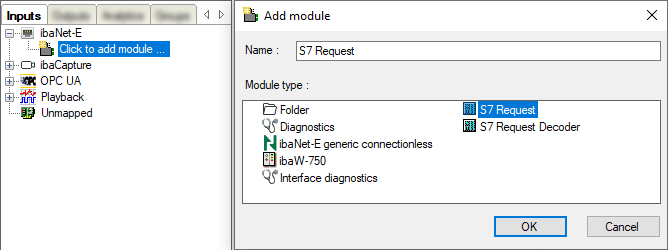
Click on the blue command Click to add module under the interface.
Select a Request S7 module in the dialog box and assign a name via the input field if required. Confirm the selection with <OK>.
-
S7 Request (for acquiring analog signals and digital signals)
-
S7 Request Decoder (for acquiring up to 32000 digital signals)
-
-
Configure the required module settings and signals as described in the following chapters. The General and Connection tabs are identical for all Request modules. The Request modules only differ in the Analog and Digital tabs.
-
After you have finished the configuration, click <Apply> or <OK> to transfer the new configuration to the device and start data acquisition with ibaPDA.
