This section describes how to configure the Request blocks in TIA Portal STEP 7 for ibaNet-E.
For each Request module
-
Copy the following blocks from the iba S7 library to the blocks folder of your STEP 7 project, see iba S7 library. One set of Request blocks has to be called for each Request module (connection) in ibaPDA.
-
ibaREQ_M (FB1400), see ibaREQ_M (FB1400)
-
ibaREQ_NetE-Buffer (FB1408), see ibaREQ_NetE-Buffer (FB1408)
-
ibaREQ_NetE-Send (FB1409), see ibaREQ_NetE-Send (FB1409)
-
ibaREQ_UDPact (FB1410), see ibaREQ_UDPact (FB1410)
-
ibaREQ_DB_NetE, ibaREQ_DB-Interface (PLC data type)
-
ibaREQ_NetE-Bufferdata (PLC data type)
Note

Only use Request blocks from the latest iba S7 library!
Request blocks in application examples can be outdated and, thus, cause errors.
Note
The request blocks do not support multi-instance calls.
-
-
Call ibaREQ_M (FB1400) preferably within OB1.
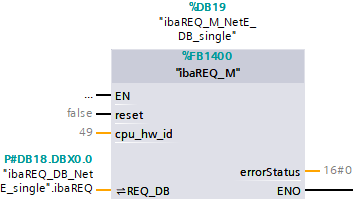
-
Enable the Retain option for the entire instance data block you have just created.
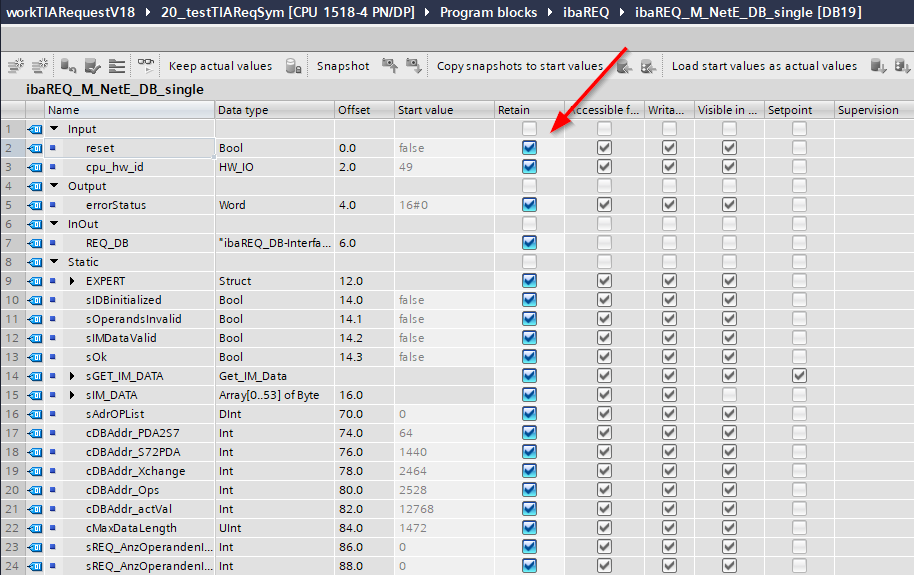
-
Call ibaREQ_NetE-Buffer (FB1408) within a cyclic interrupt OB (OB3x).
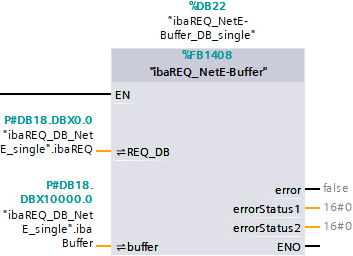
-
Call ibaREQ_NetE-Send (FB1409) preferably within OB1.
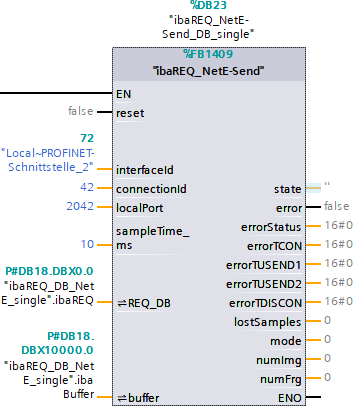


For each additional Request module
-
In the blocks folder, an ibaREQ_DB data block has to be available for each Request module. Copy the data block and assign a new unique DB number.
-
Within OB1, ibaREQ_M (FB1400) has to be called once more with the new DB number for each Request module.
-
Within a cyclic interrupt OB (Ob3x), ibaREQ_NetE-Buffer (FB1408) has to be called once more with the new DB number for each Request module.
-
Within OB1, ibaREQ_NetE-Send (FB1409) has to be called once more with the new DB number for each Request module.
-
Make sure that all instance data blocks are unique and that unique values are assigned for the connectionId parameters.
Final
-
Load all blocks to the S7 CPU and restart the S7 CPU.