A common task is the replacement of an existing Request-S7 solution based on the ibaCom-L2B card by an ibaBM-DP. This might be required in case of spare parts (the ibaCom-L2B card is discontinued) or when a new computer without PCI slots is used.

This task can be solved in an easy way by using the ibaCom-L2B compatible modules of ibaBM-DP.
No modifications in the program and the hardware configuration of the S7-CPU are required!
As for the ibaCom-L2B card also for the compatible solution with ibaBM-DP no network connection between ibaPDA computer and the S7-CPU is required. The measurement values (Request handshake) are requested via FO and are sent via the PROFIBUS I/O range.
The following steps have to be performed for the replacement:
-
If required, install a new ibaFOB-D card in the ibaPDA computer. A card with input and output is needed (ibaFOB-io-D, ibaFOB-2io-D or ibaFOB-4io-D) as the compatible modules can only be used in the bidirectional 32Mbit Flex mode.
-
Connect the ibaBM-DP to the ibaFOB-D card via the bidirectional FO cable.
-
Connect the PROFIBUS connector of the ibaCom-L2B card to the PROFIBUS plugs of the ibaBM-DP.
-
In the ibaPDA I/O Manager, a newly installed ibaFOB-D card is displayed. Configure an ibaBM-DP device on the respective link.
-
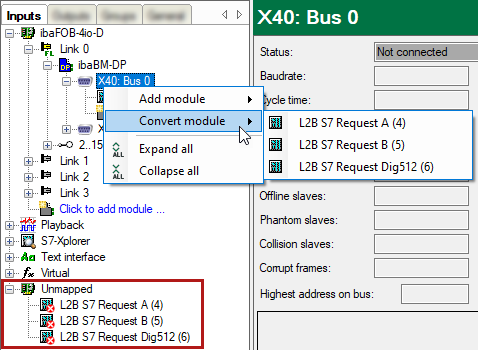
Click with the right mouse button on the PROFIBUS links and select Convert module in the context menu.
All available L2B Request-S7 modules are displayed.
Select here the modules you want to convert to an ibaCom-L2B compatible module (usually all modules).
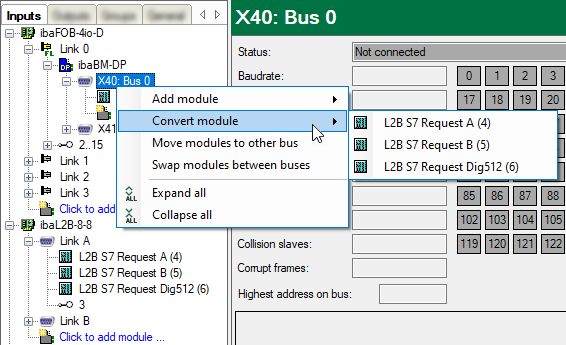
The selected modules are deleted on the ibaCom-L2B card and converted into compatible modules on the ibaBM-DP device.
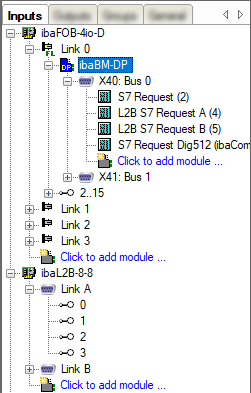
The conversion is finished.
-
Apply the new configuration with <OK>.


Note |
|
|---|---|
 |
You can also convert L2B Request-S7 modules if the modules are filed under the unmapped modules. This is e.g. the case if the existing I/O configuration incl. L2B Request S7 modules is loaded on a new ibaPDA computer, that does not have an ibaCom-L2B anymore, but only the combination of ibaFOB-D and ibaBM-DP.
|