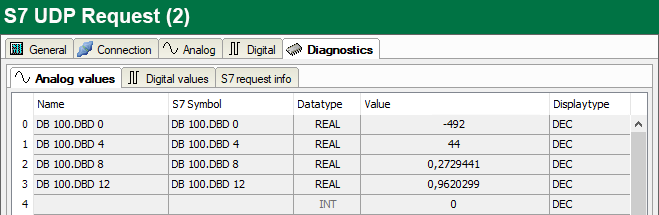
In the Diagnostics tab on the subtabs Analog values and Digital values, you can view all configured operands in tabular form with their data type and actual value.
On the S7 request info subtab, you can view the data sent to the S7-CPU, and the data that are reported back as well as the general diagnostics data.
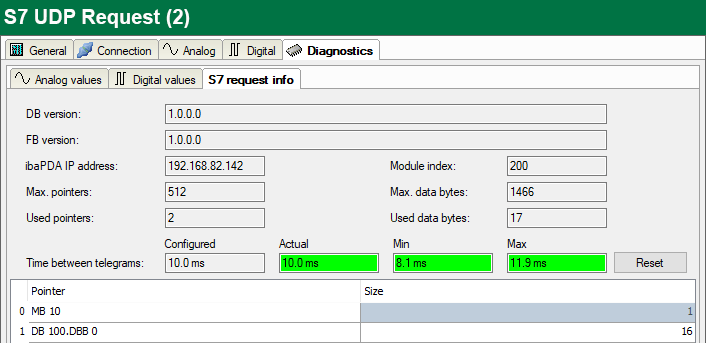
DB version
Version of the data block used in the CPU
FB version
Version of the function block used in the CPU
ibaPDA IP address
IP address of the ibaPDA computer sent to the S7-CPU.
Module index
Module index sent to the S7-CPU (see also General module settings)
Max. pointers
The max. number of used pointers (depends on the size of the data block ibaREQ_DB).
Used pointers
Currently used number of pointers.
Max. data bytes
Max. size of the user data in the data telegrams to ibaPDA
Used data bytes
Currently used bytes in the user data of the data telegrams.
Time between telegrams:
Configured: Corresponds to the setting Timebase on the General tab Actual: Time between the two last received telegrams Min: shortest time Max: longest time
The background color of the values Actual, Min and Max provides additional information:
|
Color |
Meaning |
|---|---|
|
Green |
The time span between two telegrams is shorter than the double of the defined timebase. |
|
Orange |
The time span between two telegrams is higher or equals the double of the defined timebase. |
<Reset>
Resetting the Min and Max values
Pointer table
Currently required data pointer with address and length
For optimizing the communication performance, signals with consecutive addresses are requested and transferred as a block (pointer).