If all system requirements are fulfilled, ibaPDA displays the S7 TCP/UDP interface in the interface tree of the I/O Manager. ibaPDA-Request-S7-UDP is a module (S7 Request) of this interface.
If you select the data interface in the tree, you can see an overview of diagnostics information on the configured connections between ibaPDA and the controllers.
The interface has the following features and configuration options.
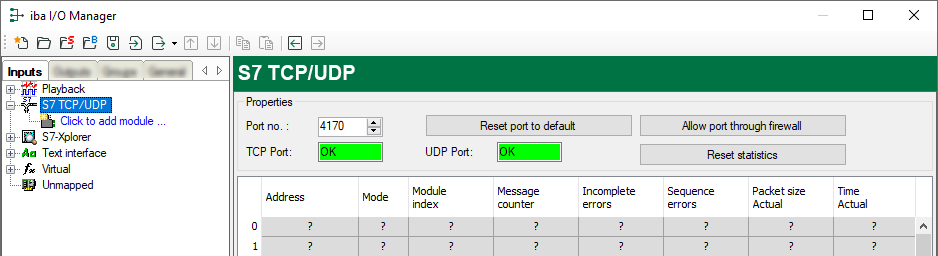
Port no.
Used port on the computer. You can change the port number, but in the S7 project engineering and in ibaPDA you must use the same port to establish a connection.
The default port number is 4170.
<Reset port to default>
Use this button to reset the port to the default port number.
<Allow ports through firewall>
When installing ibaPDA, the default port numbers of the used protocols are automatically entered in the firewall. If you change the port number or enable the interface subsequently, you have to enable this port in the firewall with this button.
TCP Port/UDP Port
Displays the port status.
-
OK: You can open the socket on this port.
-
ERROR: Conflicts occur, e.g. the port is already occupied.
<Reset statistics>
Click this button to reset the calculated times and error counters in the table to 0.
Connection table
For each connection, the table shows the connection status, the current values for the update time (actual value, average, min. and max.) as well as the data size. In addition, there is an error counter for the individual connections during the acquisition.
See Connection table.
By double-clicking on a row, you can open the configuration of the corresponding module.
For information about the connection diagnostics, see Diagnostics.
Other documentation |
|
|---|---|
 |
For more information about the interface ibaPDA-Interface-S7-TCP/UDP, see the corresponding manual. |