In a multistation network, a trigger from one participant can be used to start or stop data recording on another participant. For this purpose there are “global triggers”. Global trigger is a property of the trigger modules, which can be enabled or disabled in the general module settings. If this property is set to True, all trigger signals in this module are considered global triggers and can be used to control data recording at another participant.
Other documentation |
|
|---|---|
 |
Detailed information on the trigger pool function and trigger modules can be found in the ibaPDA documentation, part 3 "Data Interfaces and Modules." |

The global trigger module is then available in the data store configuration of all other participants in the multistation network and can only be activated in the start or stop trigger pool.
The global trigger module is listed with one line and an indication of the original system in the trigger pool. It can only be enabled entirely, the access to particular global trigger signals is not possible. In terms of a logical OR operation, a trigger is activated when one of the global trigger signals (in the source) triggers.

When a global trigger is activated, the station concerned sends a message via the data connections (network) to all other systems. This message contains the following information, among other things:
-
Name of the trigger event
-
Trigger condition
-
Name of the multistation participant where the trigger occurred
-
Precise time stamp
-
Synchronized sample counter (for synchronized operation)
Transferring the sample number ensures that the trigger event is inserted at the same sample position in all recorded data files. Since all systems count the samples in perfect synchronization, this ensures precise alignment. Only by different pre- and post-trigger times at the store configuration, different intervals, e.g. from the starting point of the data file to the trigger event, can be present in the data file.
The transmission of the trigger name provides for the information which event activated the trigger. Since the trigger name can be used to create the data file name, data files can be generated that can be clearly assigned to a trigger event.
To include the trigger name into the file name you must enable the “Add trigger name” option in the configuration dialog of the data store under Files.

This option is only available if "Use start trigger pool" or "Use stop trigger pool" has been selected as the trigger type in the trigger settings for the store.
Example
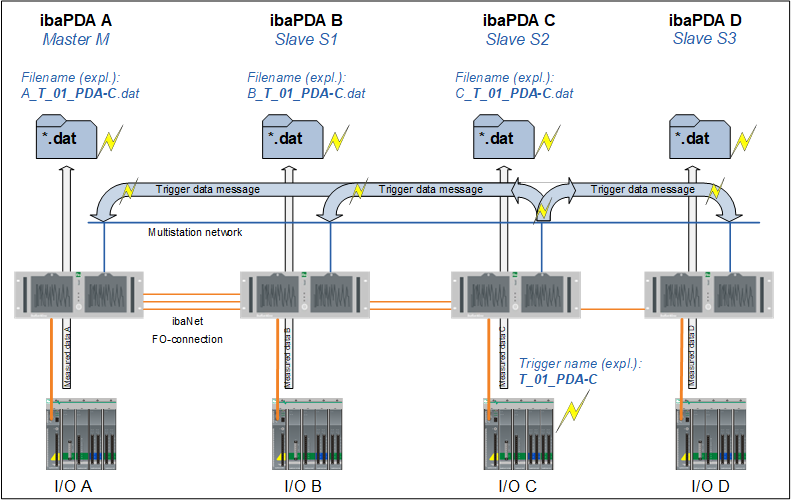
The image shows a configuration consisting of 4 ibaPDA systems
In the “ibaPDA C” system, a trigger named T_01_PDA-C is defined, that belongs to the group of global triggers. When the trigger in the “ibaPDA C” system occurs, a message comprising the trigger event is sent to all of the other participants in the multistation network via the data connection.
If data stores are configured in other systems with the global trigger e.g. in the start trigger pool, recordings are started there at the same time. When recordings are started or stopped by a trigger pool, the triggering events are written to the measurement file as info fields. The following info fields for a start trigger can be found in the info node of the data file:
-
“start_event”, followed by the signal and/or trigger name
-
“start_event_expression”, followed by an expression which evaluates the signal
Accordingly, the info fields “stop_event” and “stop_event_expression” exist for the stop trigger. To ensure that the generated data files can be easily linked to the trigger event, the "Add trigger name" option was selected in the data store configuration on all systems. The data files for the individual systems then have the trigger name T_01_PDA-C in their file names.
In order to be able to identify the data files later in ibaAnalyzer, the file names begin with the name of the respective ibaPDA system, as in this example B_T-01_PDA-C.dat for system “B”.
In addition, the info fields "start_event_type" for start triggers and "stop_event_type" for stop triggers are added to the data files. These info fields indicate which trigger type triggered the respective data file. The info fields can have the following values:
|
Value |
Meaning |
|---|---|
|
0 (local) |
This is a local trigger. |
|
1 (external synchronized) |
This is a synchronized external trigger. |
|
2 (external synchronized) |
This is an unsynchronized external trigger whose time stamp could be synchronized with the local data. |
|
3 (external unsynchronized invalid time) |
This is an unsynchronized external trigger whose time stamp deviated by more than 5 seconds from the current UTC time when it was received. A data file was generated, but the trigger time stamp was changed to the current UTC system time. |
Displaying information in ibaAnalyzer
The following image shows an open data file with info fields for the start trigger with name, expression, and type.
