Proceed as follows to configure the master in the multistation network.
-
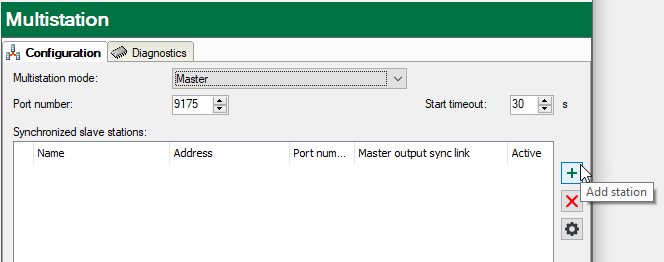
In the Multistation mode field, select the "Master" option.
The dialog shows additional settings options, see Multistation configuration.
-
Add all participating ibaPDA systems under Synchronized systems (Synchronized slave stations).
To do this, click on the button
 .
.A browser is opened, where all ibaPDA servers that are active in the network are listed.
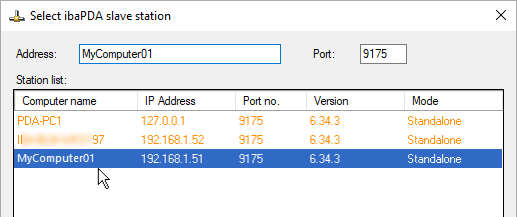
In addition to the computer name, IP address, port number, and ibaPDA version, the current multistation mode of the ibaPDA systems is also displayed.
The color of the lines has the following meaning:
-
Green: The system supports multistation operation and the computer is already in the “Synchronized slave” (Slave) mode.
-
Orange: The system supports multistation operation and the computer is not in the right mode (“Standalone” or “Non-synchronized slave”(“Slave without Master”).
-
Red: The system does not support multistation operation (software upgrade required).
-
-
Select a system that should be run as synchronized slave.
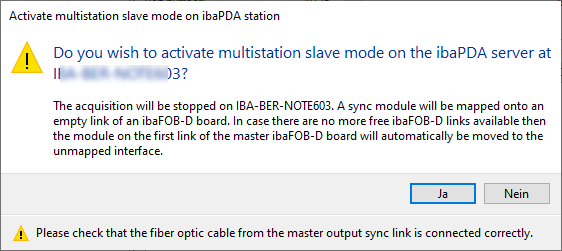
If the system in question is in "Standalone" or "Non-synchronized slave" (Slave without Master) mode, a note appears asking whether the mode should be changed to "Synchronized slave” (Slave).
-
Confirm with <Yes>.
The acquisition on the slave is then stopped, the system is set to the "Synchronized slave" (Slave) multistation mode, and is then ready to be started together with the master system.
-
Optionally, assign a name for the connection to the synchronized slave.
The computer name is used by default.
-
Enter the IP address or computer name in the Address column if it has not been entered automatically.
-
Enter the port number in the corresponding column if it has not been entered automatically.
Make sure, that all involved computers in the multistation network use the same port number.
-
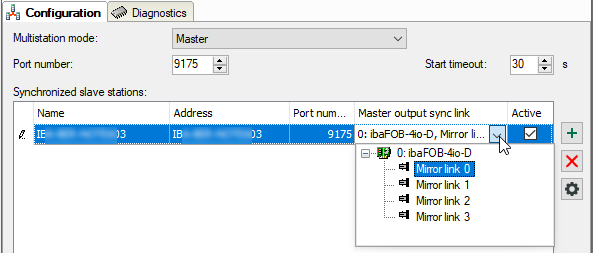
Finally, select the link of an ibaFOB-4o-D output card (mirror module) of the master, which is connected to an input of the ibaFOB-D input card (interrupt master) in the relevant slave. The computer is synchronized via this link.
-
Perform the necessary steps to configure the added slave.
-
Repeat steps 2 through 9 until all synchronized slaves are connected.
-
If non-synchronized slaves are to participate in the multistation network, enable support for these connections with the master. To do this, select the communication protocol under Non-synchronized systems (Unsynchronized stations).
For further information on the differences between and application of UDP multicast and UDP unicast, see Configuring a non synchronized slave.


Note |
|
|---|---|
 |
Communication with non-synchronized slaves must also be configured if two multistation masters are to be connected in order to exchange trigger signals via the network ("interstation triggering"). |