Additional parameters can be used both in SQL queries as well as in SQL commands. You can use these parameters to dynamically design queries or create conditions that expand or narrow the result space. With commands, you can use parameters to write signal values in a database.
Parameters can generally only replace values.
You defined the parameters in the SQL statements and then linked with signals in ibaPDA. Proceed as follows here:
-
Write an SQL statement containing parameters. Parameters are marked differently for the different database systems with the first character in the parameter name.
-
For SQL Server, PostgreSQL and MySQL, it is "@".
-
For Oracle and SAP HANA, it is ":".
-
-
Then click on the green arrow between the windows. Example SQL query depending on the product ID with a parameter "myProduct_Ident".
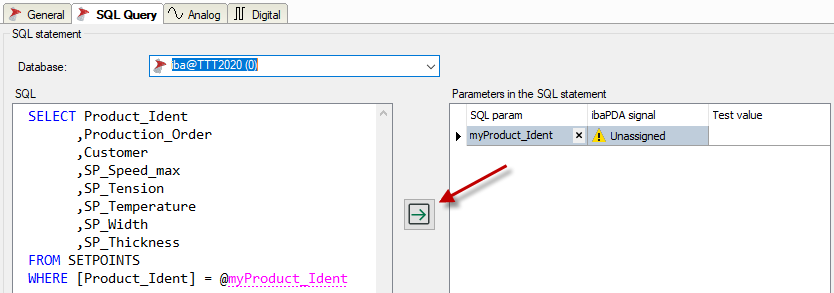
All parameters in the statement are transferred into the table in the right window. If there are already parameters there, you will be asked whether surplus parameters should be deleted.
-
In the ibaPDA signal column, you can now select a signal that should determine the parameter value. All common signal types are permitted: Analog signals , digital signals and text signals.
-
If necessary, you can delete individual parameters from the list. Click on the desired parameter and then on the <X> button in the SQL parameter column.
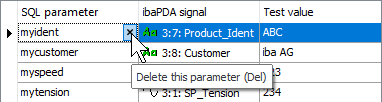


The selected signal provides a value for the parameter when executing the statement.
You can enter a value in the Test value column so that the statement can be executed, for example when testing or when validating to start the measurement. Simply enter the value as a text. The test value is correctly interpreted using the type of the assigned signal.
Digital signals have the values 0 or 1.
Note |
|
|---|---|
 |
When testing a statement, the parameter table may contain more parameters than are used in the statement. When testing, surplus parameters are ignored and there is only a warning notice. Before starting the acquisition, however, you need to delete all of the unused parameters from the table because they are not ignored during acquisition and this may result in errors. |
Note |
|
|---|---|
|
When using parameters in a query condition (WHERE statement), note that when changing the parameter value during operation more or fewer rows may be in the result than originally intended when configuring the module. In this case, the number of results and the number of signals no longer match. If the result contains more rows than corresponding signals, the surplus results are not taken into consideration. If the result contains fewer rows than corresponding signals are present, some signals are not refreshed. |