If the data interface is selected in the tree, you can see an overview of diagnostics information on the configured connections between ibaPDA and the NCKs.
The interface has the following features and configuration options.
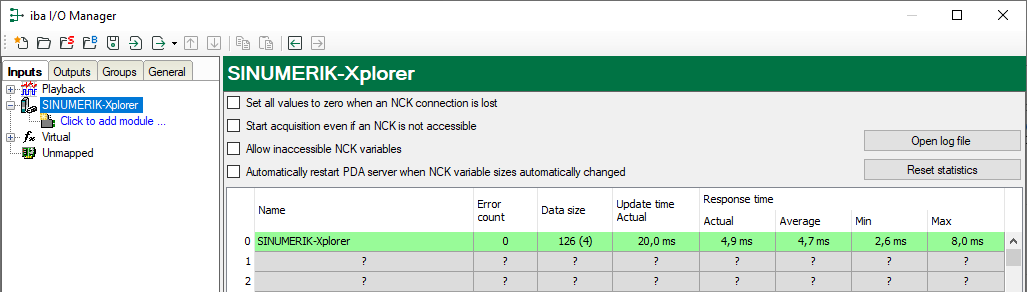
Set all values to zero when an NCK connection is lost
If this option is enabled, all measured values of the NCK are reset to 0 as soon as the connection is lost. If this option is disabled, ibaPDA keeps the last valid measured value in memory when the connection is lost.
Start acquisition even if an NCK is not accessible
If this option is enabled, the acquisition starts even if the NCK is not accessible. A warning is prompted in the validation dialog, not an error. If the system was started without a connection to the NCK, ibaPDA periodically attempt to connect to the NCK.
Enabling this option is recommended if multiple connections are configured to one CPU. Because the SINUMERIK CPU is unable to launch multiple connections at a time, this will provide for a smooth start of acquisition.
Allow inaccessible NCK variables
If this option is enabled, the acquisition starts even if NCK variables are not accessible or if they are configured with an incorrect size. These inaccessible variables are prompted as warnings in the validation dialog box, not as errors.
Automatically restart PDA server when NCK variable sizes automatically changed
If this option is enabled, the ibaPDA server will automatically be restarted when the NCK variable sizes changed automatically.
<Open log file>
If connections to controllers have been established, all connection specific actions
are recorded in a text file. Using this button, you can open and check this file.
In the file system on the hard disk, you find the log files of this interface in the
path …\ProgramData\iba\ibaPDA\Log. The file name of the current log file is InterfaceLog.txt; the name of the archived log files is InterfaceLog_yyyy_mm_dd_hh_mm_ss.txt.
<Reset statistics>
Click this button to reset the calculated times and error counters in the table to 0.
Connection table
For each connection, the table shows the connection status, the current values for the update time (actual value, average, min. and max.) as well as the data size. In addition, there is an error counter for the individual connections during the acquisition.
For more information, see Connection table.