In ibaPDA, you can also access GUD variables and R parameters from the controller.
GUD (Global User Data)
ibaPDA can read GUD variables from the connected controller.
If no GUD variables are stored in the address book, you can add them via the connection settings of the module to the GUD variables from the controller.
Click on <Create address books> in the Connection tab.
ibaPDA reads the GUD variables from the controller. The GUD variables are then available in the symbol browser.
R parameters
R parameters are also user variables which can be read and written. They can be viewed and preassigned in the HMI.
To do this, select the R variables area in the User variable submenu in the PARAMETERS area.
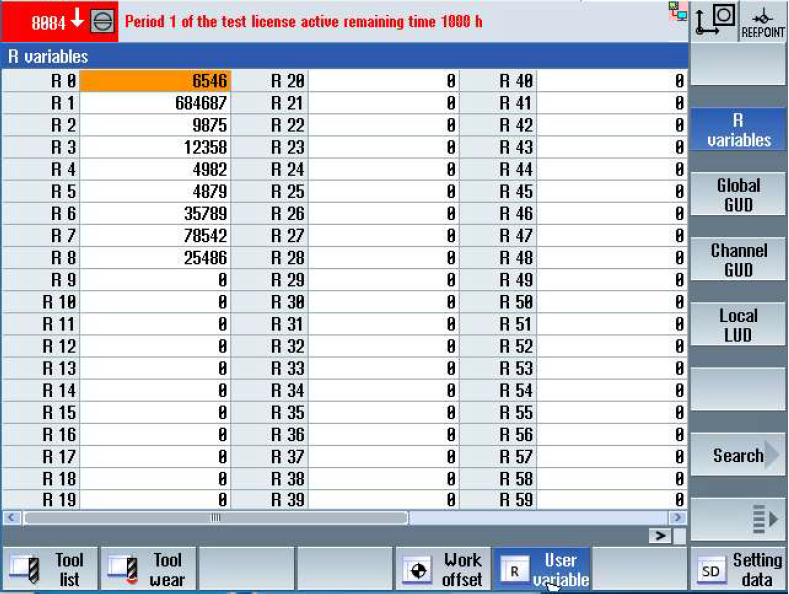
In order to read the corresponding R parameters in ibaPDA, the variable "rpa" can be searched for via the symbol browser, which corresponds to the R parameters in the SINUMERIK.
To read in a specific R parameter, the corresponding number of the R parameter must be entered in the Row column.
Note that the HMI is 0-based and ibaPDA is 1-based. Therefore, 1 must be added to the HMI R parameter number.
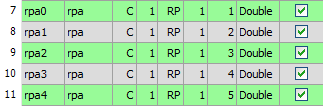
In ibaPDA, you have to enter the names of the R parameter variables manually. The names can be helpful for later orientation.