This mode activates a connection over the interface cards of the computer that are configured using SIMATIC Net.
You can use the interfaces configured in SIMATIC Net, e.g.:
-
MPI adapter (COM)
-
MPI adapter (USB)
-
PROFIBUS (CP5611, CP5622)
-
TCPIP (RFC1005)
-
…
Note |
|
|---|---|
 |
If you want to use this connection type, the Siemens software SIMATIC Net (e.g. SIMATIC Manager or Softnet) has to be installed. When using the modules CP55…, CP56… and the MPI adapter, the installation of the device drivers is sufficient. |
Note |
|
|---|---|
|
ibaPDA does not support the SIMATIC PC/PPI cable as well as the SIMATIC USB/PPI cable for connecting S7-200 CPUs. For this purpose, either use a CP56xx (PPI) on the computer side, or a CP243-1 with TCP/IP on the PLC side. |

Connection mode
Selection of the PC/CP connection mode
Connection type
Selection of the connection type PG, OP, or other connections (determines which type of connection resource is occupied on the CPU).
Timeout
Specify a value for the timeout in seconds for establishing the connection and for read access. If the time set here is exceeded, ibaPDA declares the controller as not accessible or not responsive.
Access point for applications
Selection of the access point to be used
For more information on creating and configuring an access point, see Setting PG/PC interface/defining new access point.

Note |
|
|---|---|
|
Configure available access points in SIMATIC Net with the "PG/PC interface settings" tool by Siemens. For the connection of ibaPDA-Interface-S7-Xplorer to SIMATIC S7 via PC/CP connections, iba generally recommends setting a specific access point for ibaPDA when ibaPDA-Interface-S7-Xplorer and SIMATIC Manager run on the same computer. With an own access point, there is no longer the risk that the access for ibaPDA-Interface-S7-Xplorer will be disturbed in case the standard access point is changed in the SIMATIC Manager. |
<Configure PG/PC interface>
This button opens the dialog box for setting the PG/PC interface of SIMATIC STEP 7.
Address
Address of the controller (MPI, PROFIBUS or IP address depending on the configured access point)
Rack
Rack number of the controller (default: 0)
Slot
Slot number of the controller in the rack (Use "0" for S7-1500 CPUs.)
Local port
By default, Windows assigns the local TCP port for S7 connections dynamically. Here, you can specify a static port if required.
<Test>
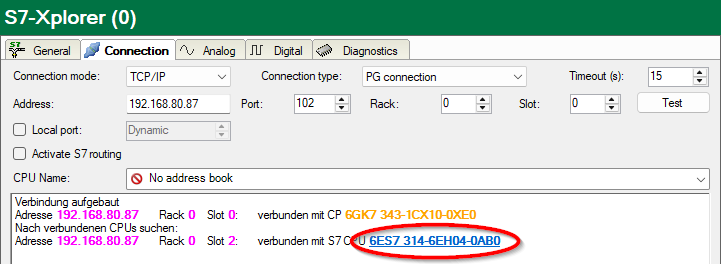
ibaPDA tests the connection to the CPU and displays available diagnostic data.

When you click on an S7-CPU (hyperlink), ibaPDA establishes the connection and displays the CPU diagnostic data.

Activate S7 routing
Activate this option if the S7-CPU and the ibaPDA computer are not in the same network, but only communicate over a gateway that supports S7 routing. Such a gateway can be e.g. an IE/PB link, over which a S7-CPU can be reached without an Ethernet connection.
Two additional input fields appear:
-
Address of device acting as gateway: Enter the IP address of the gateway.
-
S7 subnet ID of target net: Enter subnet ID from STEP 7 NetPro or TIA Portal.
For more information on S7 routing, see S7 routing.
Use ibaPDA-S7-Xplorer Proxy
For a connection to S7-PLCSIM it is necessary to use the ibaPDA-S7-Xplorer Proxy, because due to operating system reasons it is not possible to establish a direct connection between the ibaPDA service and S7-PLCSIM.
Two additional input fields appear:
-
IP address or hostname of the ibaPDA-S7-Proxy computer
-
Number of the port used by the ibaPDA-S7-Proxy
For more information on ibaPDA-S7-Xplorer Proxy see also Connection with S7-PLCSIM via ibaPDA-S7-Xplorer Proxy and ibaPDA-S7-Xplorer Proxy for PC/CP interface.
CPU Name
Selection of the linked address book
Tip for S7-300 and S7-400 CPUs |
|
|---|---|
 |
If you do not know the rack number and/or slot number, enter "0" and click the <Test> button. ibaPDA then tries to establish a connection. If the connection is successfully established, ibaPDA scans the relevant rack for available CPUs. ibaPDA lists the CPUs found with rack number and slot numbers. The CP to which ibaPDA is directly connected is always at the top. When you click S7-CPU (hyperlink), ibaPDA establishes the connection and displays the CPU diagnostic data.
|
Note |
|
|---|---|
|
If no PLC or CPU is displayed for the MPI access point, check the interface setting in the SIMATIC Manager. ibaPDA does not detect an online connection if a PG/PC interface with interface parameterization "AUTO" has been set for MPI adapter or CPs in the SIMATIC Manager. In this case, you need to change the interface or the access point. |