Note the following when using the S7-Xplorer module on the CPUs S7-1200 and S7-1500:
Connection mode TCP/IP or PC/CP
Access to data blocks only without Optimized block access.

PUT/GET communication for TCP/IP or PC/CP:
Up to TIA Portal V18, make the following settings in the TIA Portal:
In the CPU properties (Properties – General – Protection – Connection mechanisms), activate the access via PUT/GET communication.
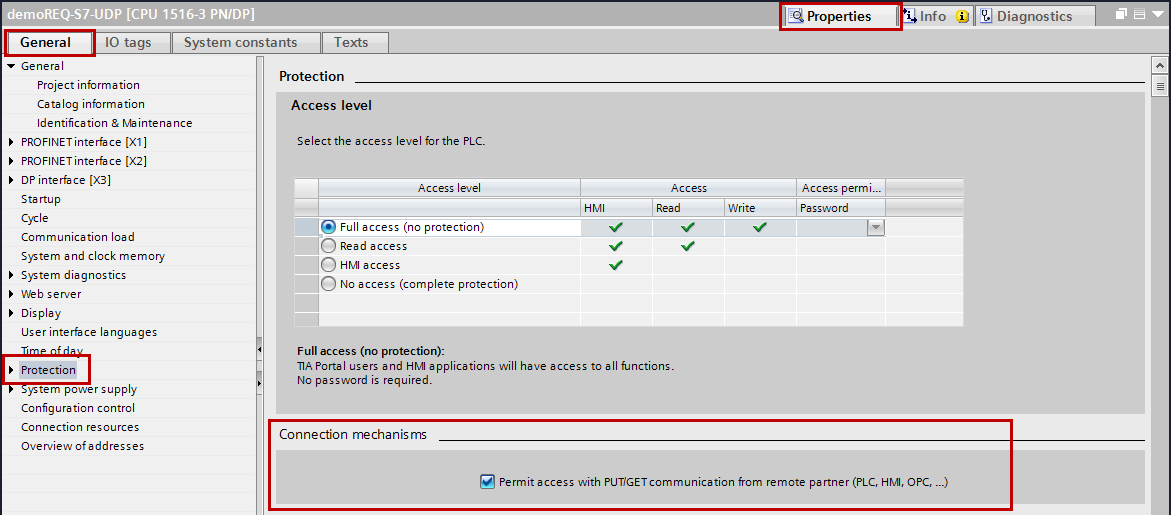
For the S7-1200, this option is only available firmware V4.0 or higher.
As of TIA Portal V19 and CPU firmware V3.1 (V4.7 for S7-1200), activate the PUT/GET access for S7-1500 and S7-1200 CPUs as follows:
-
In the project navigation, navigate to Security settings – Users and roles – Roles tab.
-
Add a new role and enter a name, e.g. "Put/Get".
-
In the Runtime rights tab, select your PLC under Function rights categories.
-
Under Function rights, activate the access level HMI access.
-
Under Users and Roles, go to the Users tab.
-
Activate the user "Anonymous".
-
Confirm the following message with <OK>.
-
Under Assigned roles, assign the newly created role to the anonymous user.
-
In the Device view, open the properties of the CPU.
-
In the section navigation, navigate to Protection & Security – Connection mechanisms.
-
Activate the option Permit access with PUT/GET communication from remote partner.
-
Save and compile the configuration and load the changes into the CPU.
You can find further information in the SiePortal under https://support.industry.siemens.com/cs/ww/en/view/109925755.
Connection mode TCP/IP S7-1x00
Nothing to observe
Access protection
You can configure an access protection for an S7-1200 and S7-1500 CPU. The following dependencies on ibaPDA apply:
|
Access level |
CPU access |
ibaPDA reads symbolic from CPU |
S7 access |
|---|---|---|---|
|
Full access (no protection) |
HMI, read, write |
OK |
OK |
|
Read access |
HMI, read |
OK |
OK |
|
HMI access |
HMI |
No |
OK |
|
No access (complete protection) |
- |
No |
No |