When you add an LMI-Gocator Health module, a standard list of frequent signals is automatically created in the Analog tab.
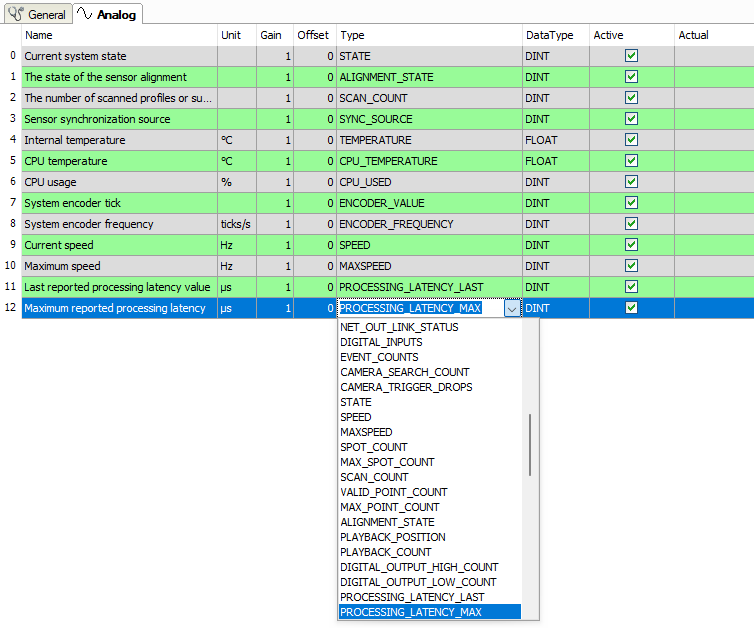
Name
Here, you can enter a signal name and additionally two comments when clicking the
 symbol in the Name field.
Unit
Here, you can enter the physical unit of the analog value.
Gain / Offset
Gradient (Gain) and y axis intercept (Offset) of a linear equation. You can convert a standardized and unitless transmitted value into a physical value.
Type
Type of status signal
The selection list contains all signal types that were known at the time of implementation. Each signal type corresponds to a unique integer value as defined in the LMI-Gocator SDK. A Gocator sensor sends a list of value pairs every second, consisting of an ID (integer value that corresponds to the status signal type) and the actual diagnostic value. ibaPDA goes through this list and checks for each entry whether it should be measured.
If an additional signal type is required, you can manually enter an integer value in the column.
Data type
Data type of the status signal
The data type is automatically assigned for the status signal types stored in ibaPDA. If you define your own signal types, select the corresponding data types from the selection list.
Active
Only when this option is selected, the signal is acquired and considered when checking the number of licensed signals.
More columns can be displayed or hidden, using the context menu (right mouse-click on the header).
Insert list of all existing signals
You can add all signals stored in ibaPDA to the Analog tab.
-
In the I/O Manager, select the LMI-Gocator Health module by holding down the <Shift> key.
If the module was already selected, first select another node to deselect it.
An additional link "Add all known signals" is displayed in the General tab.
-
Click on the link.
All existing analog and digital signals are entered in the corresponding registers.