The following module settings can be configured on General tab:
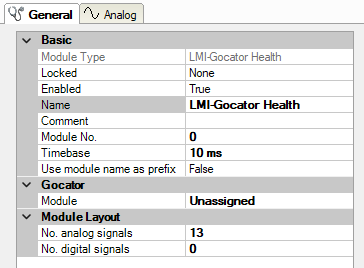
Basic settings
Module Type (information only)
Indicates the type of the current module.
Locked
You can lock a module to avoid unintentional or unauthorized changing of the module settings.
Enabled
Enable the module to record signals.
Name
You can enter a name for the module here.
Comment
You can enter a comment or description of the module here. This will be displayed as a tooltip in the signal tree.
Module No.
This internal reference number of the module determines the order of the modules in the signal tree of ibaPDA client and ibaAnalyzer.
Timebase
All signals of the module are sampled on this timebase.
Use module name as prefix
This option puts the module name in front of the signal names.
Gocator settings
In addition to the basic settings, the following settings can also be configured:
Module
LMI-Gocator module to which the status module is linked
A status module must always be linked to a regular LMI-Gocator module.
Sensor
Selection of the sensor for which the diagnostic and status data is to be measured
The field is only displayed if several Gocator sensors are configured in the LMI Gocator module.
Module Layout
Number of analog signals
Number of analog signals measured with the health module
For further information on displaying the analog signals, see chapter LMI-Gocator Health – Analog and Digital tab.
Number of digital signals
Number of digital signals measured with the health module