The following module settings can be configured on General tab:
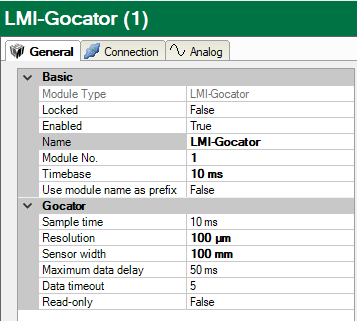
Basic settings
Module Type (information only)
Indicates the type of the current module.
Locked
You can lock a module to avoid unintentional or unauthorized changing of the module settings.
Enabled
Enable the module to record signals.
Name
You can enter a name for the module here.
Comment
You can enter a comment or description of the module here. This will be displayed as a tooltip in the signal tree.
Module No.
This internal reference number of the module determines the order of the modules in the signal tree of ibaPDA client and ibaAnalyzer.
Timebase
All signals of the module are sampled on this timebase.
Use module name as prefix
This option puts the module name in front of the signal names.
Gocator settings
In addition to the basic settings, the following settings can also be configured:
Sample time
Definition of how quickly the profile data is generated by the Gocator sensors
Theoretically, it is possible to set the sampling time to less than 1 ms, although in practical applications this may be limited by the sensors.
Resolution
Distance between two neighboring samples of the profile in micrometers
You can freely choose the resolution. When the resolution value is changed, ibaPDA automatically adjusts the number of analog signals.
Sensor width
The sensor width determines the width of the measured profile on the X-axis (as defined in the Gocator documentation) of a Gocator sensor. This means that the profile width is the same for all Gocator sensors in the module. When using Gocator sensors in buddy mode, the master sensor acts as a relatively wide, virtual sensor; the sensor width then corresponds to the total profile width of all Gocator sensors together. The sensor width can be configured with a resolution of up to 1 µm.
Maximum data delay
Maximum allowed difference (in ms) between the requested timestamp and the aczual timestamp of the (reconstructed) profile
This parameter only needs to be changed in the event of network problems.
Data timeout
Number of sample times that ibaPDA can wait without receiving a new (reconstructed) profile.
This parameter only needs to be changed in the event of network problems.
Read-only
If this option is activated, ibaPDA does not change any settings in the Gocator sensors. If Gocator sensors are used in a buddy configuration, this option must be activated.