-
Click on the blue link Click to add module located under each data interface in the Inputs or Outputs tab.
-
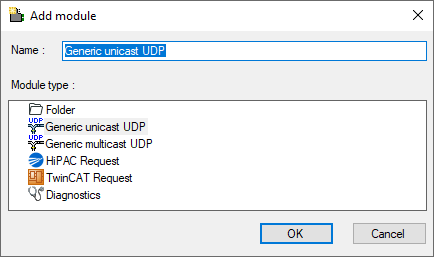
Select the desired module type in the dialog box and assign a name via the input field if required.
-
Confirm the selection with <OK>.
Module types
You can add the following module types to the interface:
-
Generic unicast UDP: see General module settings
-
Generic multicast UDP: see General module settings
-
HiPAC Request: see manual ibaPDA-Request-HiPAC
-
TwinCAT Request: see manual ibaPDA-Request-TwinCAT
Tip |
|
|---|---|
 |
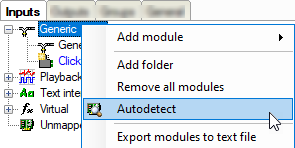
Cyclic unicast UDP messages that have their destination port in the UDP port range of the interface are displayed automatically in the connection table, even if no corresponding modules have been defined and ibaPDA was not started before. You can create modules for these links easily with a right click on the Generic UDP interface icon in the tree view and select Autodetect in the context menu.
By applying Autodetect, a Generic Unicast UDP module with 32 analog signals (data type FLOAT) and 32 digital signals is created for each link. |
Note |
|
|---|---|
 |
The Autodetect functionality only works for UDP unicast messages. |