After the configuration has been accepted, ibaPDA displays the following data for the interface:
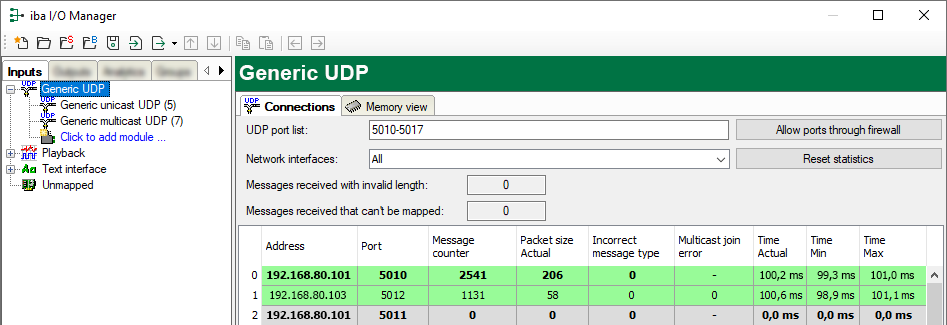
Message counter
Messages received with invalid length
Counts a received message that is longer than 4096 bytes. The message is rejected.
Messages received that cannot be mapped
When receiving messages of a new connection, this value is incremented in case all available connection entries are already in use.Cause: ibaPDA receives more connections than the license supports.
Connection table
Display variants
|
Green background/ bold text |
The connection is ok and there is a module assigned to it. |
|
Green background/ standard text |
The connection is ok, but there is no module assigned to it. |
|
Gray background/ bold text |
A module is defined, but no connection has been established with these parameters. |
Connection data
-
Source IP address
-
Destination port
-
Receive message counter
-
Data length of the received telegrams
-
Counter for incorrect message types, e.g. when unicast messages are sent to multicast connections and vice versa.
-
Counter for multicast join errors
Possible errors
If the connections are not displayed or only partially, this may have the following causes:
-
The controller is not sending.
-
No Ethernet connection between ibaPDA PC and the controller
-
Error in the controller configuration:
-
Incorrect remote IP address
-
The port number does not match the ibaPDA settings.
-
The port number is blocked by the firewall.
-
Other errors:
-
If the telegram counters do not increment continuously, the messages are not sent cyclically on the controller side.
-
If the values for data length change, this indicates that different telegrams with different layouts are being sent over the same connection.