To configure the AN-X-DCSNet device, proceed as follows:
-
Configure the IP address of the AN-X-DCSNet device as described in the device manual.
-
Access he device's web interface and navigate to the DCSNet Configuration section.
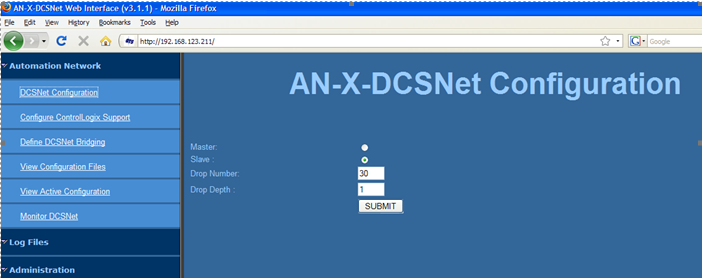
-
Configure the device mode according to the DCS network setup.
-
If no master is present on the network, set the device to Master mode.
-
If a master already exists, set the device to Slave mode.
-
-
If the device is set to Slave mode, configure the drops on the device by specifying:
-
Start drop number (Drop Number)
-
Drop Depth (number of drops mapped on the device)
Increasing the number of configured drops will slow down the DCS network. The device can still monitor data from all drops on the network, regardless of whether they are mapped.
-
-
To write the configuration to the device, click <SUBMIT>.
