This chapter describes the configuration of the MQTT timebased data store. The topics are configured in the Topics subnode, see chapter Configuring topics.
The configuration of the MQTT Sparkplug B data store is described in chapter MQTT Sparkplug B data store.

General
Locked
You can lock a data store in order to prevent an accidental or unauthorized change of settings.
Active
Activate the data storage in order to record data. However, you can configure various data stores and disable data stores that are not required.
Data store index
Unique index of all existing MQTT data stores. You need to reference this index e.g. in the virtual function DataStoreInfoMQTT() for generating diagnostic data for a specific MQTT data store.
Data store name
You can enter a name for the data store here.
Broker address
Enter the address of the broker here. The address can be an IP address, a host name or a URL.
Port
Port that is to be used for the connection. The default MQTT port is 1883, or 8883 when using SSL.
Client ID
When connecting to a broker, each client must choose a unique name that is used only once for this broker. The client ID is pre-set by ibaPDA automatically.
Base Topic Path
This path is added in front of each registered topic (optional setting). The topic configuration can be made easier if all topics reside within a common path.
Note: Do not use a leading forward slash "/" in a topic, because this would add an empty path entry to the topic. Two separators next to each other ("//") are also not allowed.
Identifier
The identifier is a text-based value that can be included in the MQTT messages sent to the broker. For the subsequent processing of data, this value may be useful for distinguishing between several ibaPDA systems that write to the same broker.
MQTT version
Select the used MQTT version
Session expiration (only available for MQTT version 5.x)
Time limitation of client sessions after the connection to the server got lost.
Use alias
Negotiation of an alias number for each topic between broker and client for the sake of a better bandwidth utilization.
Persistent session
If the client is disconnected, it receives the last values sent to the broker when reconnecting with the same client ID as before. For this purpose, the QoS must be set to "Exactly once" or "At least once" not only for ibaPDA, but also for the sender, which delivers the values to the broker.
Keep Alive
The time for sending a Keep Alive telegram to the broker to make sure that the connection is still online.
QoS
Quality of Service, which is used when registering to a topic on the broker. The possible values are:
-
At most once (messages can be dropped)
-
At least once (messages are repeated if an acknowledgement is not sent within a certain time)
-
Exactly once (a secured handshake protocol for each message sent)
<Test connection>
Click on the button <Test connection> to verify if ibaPDA can establish a connection to the MQTT broker using the selected security settings.
Security options
Use TSL/SSL connection
Use TSL or SSL instead of plain TCP connection. The port must be set to 8883 by default. This option has to be configured accordingly on the broker, otherwise the connection will fail.
Authentication mode
The following are available:
-
None: without authentication
-
Login: Enter the user name and password as login when connecting to the broker. This option has to be configured accordingly on the broker, otherwise the connection will fail.
-
Certificate: The certificates that can be used are available for selection in the drop-down menu. In addition more options can be selected:
-
-
No certificate: No certificate is used. However, this usually causes the validation to fail.
-
Manage certificates: Opens the central certificate store, where certificates can be managed centrally in ibaPDA .
-
Create new certificate: ibaPDA creates a new self-signed certificate. Enter the necessary settings in the opening dialog. When the certificate is successfully created, the new certificate is selected.
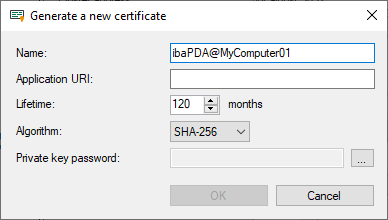
Enter a name for the certificate. You can change the default name.
Entering an Application URI is optional. Set the lifetime and select the algorithm. Available for selection are SHA-256, SHA-384 and SHA-512.
You have to assign a password in order to create a certificate. To enter the password for the private key, click the <…> button. For security reasons, you must enter the password twice in the following dialog. The password can be assigned arbitrarily, it does not have to meet any other requirements.
-
-
Last Will
Enable Last Will
If this option is enabled, the absence of this client is announced to other clients, if the connection breaks without regular disconnect.
Topic
Enter a path to the topic used for the last will message. The base topic path is not applied to this topic.
Message
Enter a message which should be sent in the text field.
Retain
If this option is enabled, the message in this topic is stored on the broker until it is overwritten.
QoS
The Quality of Service used for sending the last will message to other clients. The QoS settings are as described above.
Connect Message
Connect Message has the same options as Last Will, but the Connect Messages are sent on a regular connect or disconnect.