After first installation, only one administrator user ("admin") exists, which always has all rights. The administrator is the only user that is not subject to any restrictions and can add or delete other users as well as change their user rights. The name "admin" cannot be changed. All users or domain users added later can be assigned the same rights as the administrator user.
Creating local users
-
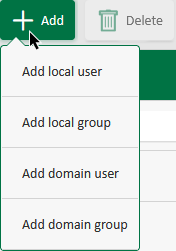
Create a new local group via the <Add> button and select <Add Local User>.
-
Enter the name, e-mail address and password in the input fields.
Note

The login name may only contain letters and digits. Spaces or special characters are not supported.
Note
The password must contain at least 6 characters and consist of uppercase letters, lowercase letters, numbers, as well as special characters.
-
Assign the permissions for the user under User permissions, see also User permissions.
-
If you want to assign the user to a group, select the group under Group memberships, see also Creating and managing user groups.
-
Save your entries.

Use the <Delete> button to delete the selected user/domain user.
Creating domain users
-
Create a new domain user via the <Add> button and select <Add Domain User>.
-
Specify the full name of the domain and the login name.
-
Assign the permissions for the user under User permissions, see also User permissions.
-
If you want to assign the user to a group, select the group under Domain group memberships, see also Creating and managing user groups.
-
Save your entries.
Note |
|
|---|---|
|
The domain login name must not be identical to the local login name, otherwise the domain user cannot be saved. |