Note |
|
|---|---|
 |
This function is only available with the ibaManagementStudio+ license. |
Under certain circumstances, license orders or changes can be linked to a WIBU container, e.g. an extension of EUP dates. License entries from these orders are referred to as Auto-updates and are always executed in the update process regardless of the WIBU action or the selected ticket. ibaManagementStudio marks such license entries with the tag [Auto-Update].
Prerequisites
-
Auto-updates are available.
-
For the system on which you want to perform the license update, the permission for remote actions is enabled, see Editing systems.
-
On the system on which you want to perform the license update, the ibaManagementStudio Agent (v2.0.0 or higher) is running and a connection to the ibaManagementStudio server is established.
-
You are using ibaManagementStudio Server v2.0.0 or higher.
-
You also need the "Edit" permission for the respective system in the ibaManagementStudio user management.
-
There is a connection to the iba Gateway for WIBU licenses.
-
The terms of use for internet access have been accepted and an internet connection is established.
Running Auto-updates without further license update
-
Select a system under Systems in the main menu and open the License information tab.
-
In the list, click on the <Update> button in the line of a WIBU license.
Confirm the warning if you want to continue with the license update despite possible status changes.
A dialog window with the associated tickets of previous updates opens. Auto-updates are also displayed here.
-
Select <Run Auto-Update>.
-
Click on <Auto-Update> to update the displayed Auto-updates.
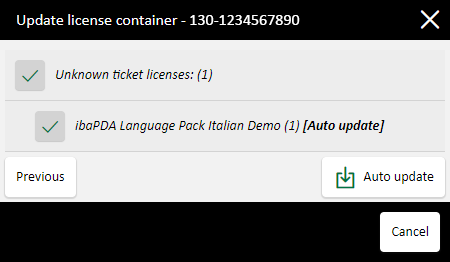
The dialog shows the update progress.

Running auto-updates automatically
You can set ibaManagementStudio to run the Auto-updates automatically without any interaction on your part. ibaManagementStudio then checks every 24 hours whether Auto-updates are available and runs them on all connected systems.
This function is deactivated by default.
-
Open Settings – Server configuration in the main menu.
-
Click on the field Automatically run available upgrades for WIBU licenses to activate or deactivate it.
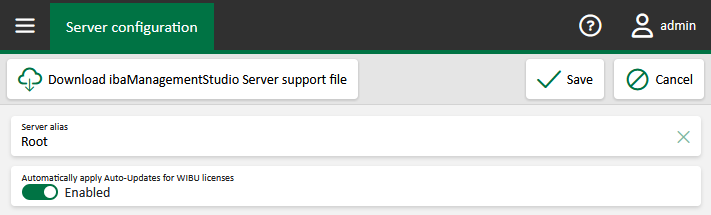
ibaManagementStudio checks every 24 hours whether Auto-updates are available and runs them on all connected systems.
