Note |
|
|---|---|
 |
This function is only available with the ibaManagementStudio+ license. |
Via the web client, you can update WIBU licenses on the connected systems. The update is carried out on the systems in the background. When the licenses are updated, license entries are activated on the WIBU ticket.
ibaManagementStudio Server automatically establishes a connection to the iba Gateway for WIBU licenses. In this way, you can update the licenses using the <Update> button.

Under certain circumstances, however, ibaManagementStudio Server cannot reach the iba Gateway, in which case you must perform a file-based license update, see Updating WIBU licenses file-based.
Prerequisites
-
For the system on which you want to perform the license update, the permission for remote actions is enabled, see Editing systems.
-
On the system on which you want to perform the license update, the ibaManagementStudio (v2.0.0 or higher) is running and a connection to the ibaManagementStudio server is established.
-
You are using ibaManagementStudio Server v2.0.0 or higher.
-
You also need the "Edit" permission for the respective system in the ibaManagementStudio user management.
-
There is a connection to the iba Gateway for WIBU licenses.
-
The terms of use for internet access have been accepted and an internet connection is established.
Updating WIBU licenses via the iba Gateway
Note |
|
|---|---|
|
The service of the software products on this system is stopped during the update. This means that e.g. ibaPDA cannot acquire signals as long as the update is running. |
-
Select a system under Systems in the main menu and open the License information tab.
-
In the list, click on the <Update> button in the line of a WIBU license.
Confirm the warning if you want to continue with the license update despite possible status changes.
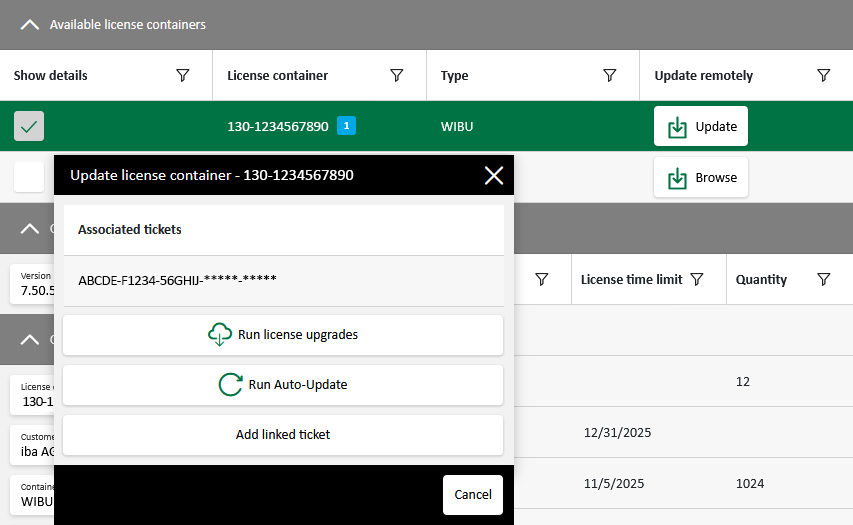
A dialog window with the associated tickets of previous updates opens.
If you have not yet performed a license update, enter a ticket number.
-
If required, you can enter further WIBU tickets using the <Add linked tickets> button.
-
Click on <Run license upgrades> so that ibaManagementStudio searches for the licenses of the specified tickets at the iba Gateway for WIBU licenses.
-
Select the tickets you want to upgrade. You cannot select or deselect individual licenses.
Under certain circumstances, license orders or changes can be linked to a WIBU container. License entries from these orders are referred to as Auto-updates and are always executed in the update process regardless of the WIBU action or the selected ticket. ibaManagementStudio marks such license entries with the tag [Auto-Update]. Auto-updates can also be performed without activating other licenses, see Running Auto-updates.
-
Click on <Activate> to start the update process in the background.
The dialog shows the update progress.
ibaManagementStudio saves tickets that you have newly entered in the ticket list for future updates.

If an error occurs during the update, ibaManagementStudio displays a WIBU error code that you can forward to iba support.