You can also update an iba software product on several systems The updates are installed on the systems in parallel.
Note |
|
|---|---|
 |
Note that the service of the software products is stopped during the update. This means that e.g. ibaPDA cannot acquire signals as long as the update is running. |
-
In the main menu under Systems, select a folder and go to iba SW product information.
Alternatively on folder level, you can also find a system that is not updated by selecting the software.
-
From the list, select a software product to update on the systems in the folder.
-
Click on <Multi update> next to the drop-down list.
-
Select the version of the update file to install and click on <Next>.
-
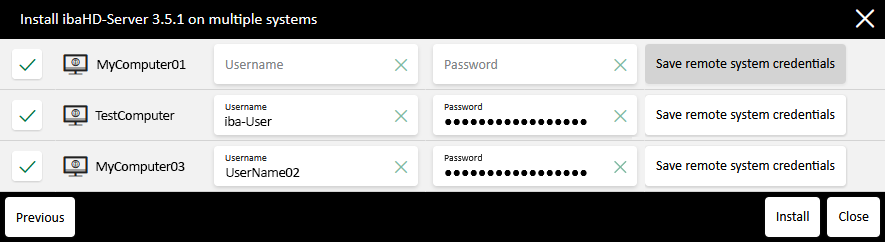
Select the systems on which to update the software.
-
Check the Windows login data for the systems if it is already stored.
Otherwise, enter the Windows credentials under which to install the update on the selected systems.
Optional: Save the Windows credentials for this system in the web client as remote system credentials.
-
Click on <Install> to start the installation.
The dialog shows the installation progress for each software product. During installation of ibaManagementStudio Agent, the affected system may briefly appear as offline in the system overview.
If you close the installation window, the installation continues. You can check the progress in the Tasks tab.
