Time periods are saved in a time period store, which you configure as a subordinate store in a time-based HD store, see Configuring a time period store.
The following settings are required for the time period store:

General
Enable storage
If you want to use the storage, this option must be enabled. Stores that are not enabled are not allocated a license.
Name/Comment
Enter a unique name and a comment (optional) for the time period store here.
If you subsequently change the name, you must update references to the time period store. A corresponding message appears when the changed configuration is applied.
Note |
|
|---|---|
 |
If the time-period store is saved in an external database, first change the name of the database table and associated metadata table in the database system and then adjust the configuration in ibaHD Manager. |
Database
Database
Name of the selected database containing the time period table. By default, ibaHD-Server creates a database for time periods as an internal SQLite database. To use the internal database, select ibaHD TimePeriod DB.
You can also use an external database. To do this, select the database or create a connection to a new database. Currently, only SQLite and Microsoft SQL Server databases are supported.

Table name
Enter a unique name for the database table here.
If you subsequently change the table name, you must update references to the tables. When applying the changed configuration, a dialog appears in which all tables are listed with the old and new table names, as well as information on the associated HD store and time period store.
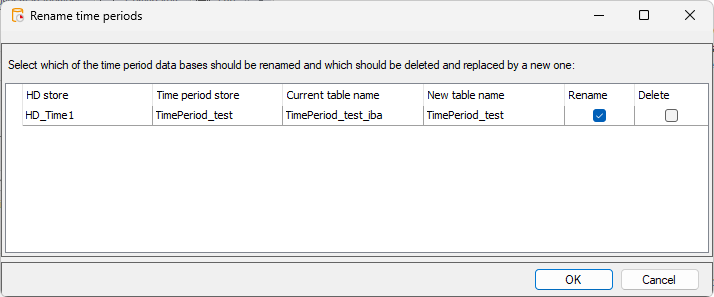
Select from the following options for all listed tables:
-
Rename: Changes the table name
-
Delete: Deletes the old table and creates a new table with the new table name
Storage
Time limit
Time periods that are older than the specified time limit are automatically cleared. By default, the time limit of the parent HD store is used. To set a different time limit for the time period, deactivate the option Use time limit of parent store.
Cleanup time periods if size/time cleanup removes all data within the time period store
Time periods are deleted if all data in the time period store is deleted.