If the card is displayed correctly in the I/O Manager, mark the Link node under the interface. 3 tabs appear on the right side displaying connection information.
For description of diagnostics information and other tabs please refer to chapter Diagnostics.
The connection to a PLUSCONTROL system is being established by clicking the <Test connection> button in the Connection tab.

If the connection to the PLUSCONTROL system has been successfully established, the following actions are performed:
-
The system information of the connected PLUSCONTROL CP is read and displayed in the Connection tab
-
The address book is read and evaluated: The address book contains all available variables. Available signal types are standard signals and preferred signals, see chapter Configuration of preferred modules.
-
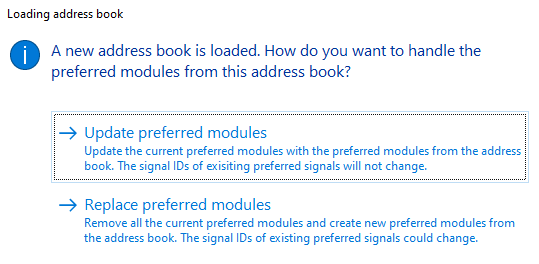
“Preferred modules” are automatically created in ibaPDA for the preferred signals. When the address book has been updated, a dialog appears providing options how to proceed with preferred signals:
-
-
Update preferred modules: The preferred modules are updated with the preferred modules from the address book. The signal IDs of already existing preferred signals remain unchanged.
-
Replace preferred modules: The current preferred modules are removed and replaced by new preferred modules from the address book. The signal IDs of existing preferred signals may change.
-
-
Groups are automatically created for preferred signals in the I/O Manager. You can enter a group name in the text box at the bottom of the tab. Default name is "ibaFOB-PlusControl".



See also chapter Groups.