Proceed as follows to configure the DB sync task in ibaDatCoordinator.
Prerequisite: The plug-in is installed.
You will find the installation file on the "iba Software & Manuals" data medium in the following directory:
…\01_iba_Software\ibaDatCoordinator\02_Plugins\DBSyncPlugin
-
To run the task regularly, e.g., every 8 hours or once a day, create a scheduled job.
See Configuring a job and Scheduled HD job and scheduled job – settings.
-
Add a DB sync task to the job.
-
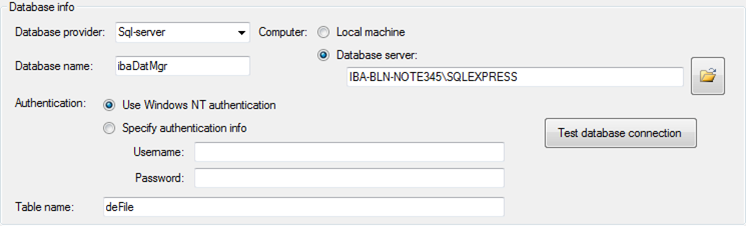
Configure the database connection in the Database information section.
Note

In order to use the synchronization results in ibaDaVIS, the database connection must refer to the same database and index table that is configured in ibaDaVIS.
If you have configured different views in ibaDaVIS that refer to different index tables, you must create a DB sync task for each index table.
-
Database provider: Choice between SQL Server, Oracle, DB-2, or ODBC (Access, MySQL)
-
Computer: Local machine or a database server
-
Database name: Database name or DSN (ODBC connection)
-
Authentication: By operating system or username and password
-
Table name: Name of the index table (ibaFile table)
Click the <Test database connection> button to check the connection to the database.
-
-
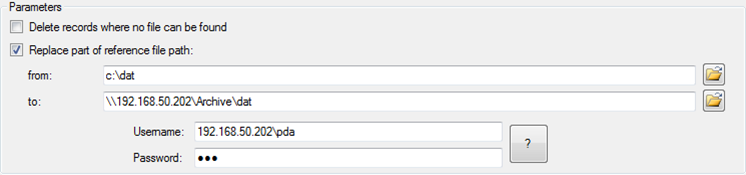
Configure the parameters for the task.
-
Delete entries for which no file was found:
If disabled, "1" is entered in an additional column called
FILE_REFERENCE_VALIDfor valid references and "0" for references for which no file could be found.If you activate this option, entries marked with "0" in the
FILE_REFERENCE_VALIDcolumn will be deleted from the index table. -
Replace part of the reference file path:
If disabled, the path entered in the database is used when accessing the data file.
If you enable this option, the first part of the file name (path) in the database column
_filenamewill be replaced for access to the data file. The value "1" is entered in theFILE_REFERENCE_VALIDcolumn if the file exists in the specified target directory (To). The value "0" is entered in theFILE_REFERENCE_VALIDcolumn if the file is located in the original directory (From) and not in the target directory. -
From: Part of the original path name that is to be replaced.
-
To: New part of the path name where the file is actually located.
-
UNC credentials: If ibaDatCoordinator needs to access a network drive, enter the login details of an authorized user here.
-
Note |
|
|---|---|
|
The FILE_REFERENCE_VALID column is automatically generated by ibaDatCoordinator if it does not already exist in the index table. In ibaDaVIS, you can see the column in the configuration dialog of the data source if you have activated the display of the iba columns. |
During synchronization, all processes are logged by the plug-in.
For more information about logging, see Chapter Logging