
Use the condition task if you want to control the execution of a subsequent task using an expression. The result of the task can be TRUE or FALSE.
You can create the condition directly from the signals in the DAT file, or in an analysis file (PDO) with logical signal definitions and sub-expressions.
It may happen that the result of the expression is neither TRUE nor FALSE. In this case, the following rules apply:
-
If the expression is not precisely defined or contains errors, the result is evaluated as FALSE.
-
For analog signals, the result is evaluated as TRUE if it is greater than 0.5. Otherwise, the expression returns FALSE.
-
If an expression is not constant, an average value is determined.
Note |
|
|---|---|
 |
The condition only affects the task that directly follows it in the tree structure of the job view, immediately below the condition. Furthermore, the task that is to be executed or not executed depending on the condition must be set to "On success" or "On failure" in the execution options. Once the dependency has been established, this is indicated by an indented task icon in the tree. |

The task-specific settings are explained below. For all other settings, see General task settings.
Expression definition
Optional analysis
Optionally, enter the full path and file name of an analysis file from which a Expression or calculation result is to be used as a condition. ibaDatCoordinator then opens the data file and loads the analysis file specified here, in which a suitable expression is defined.
Expression
Enter the name of the (finished) expression.
If you want to configure the condition without an analysis file, simply enter a signal contained in the data file in the Expression field. You can also enter a formula or an expression, in which the signals from the data file are used. In this case, the command syntax of ibaAnalyzer must be taken into account.
X-type
As the expressions are calculated by ibaAnalyzer and ibaAnalyzer can calculate the expressions in different ways, you need to define the type of the X-axis. The X-axis type specifies how ibaAnalyzer calculates an expression. ibaAnalyzer can interpret an expression as time, length, frequency, or inverse length.
Condition using an analysis file
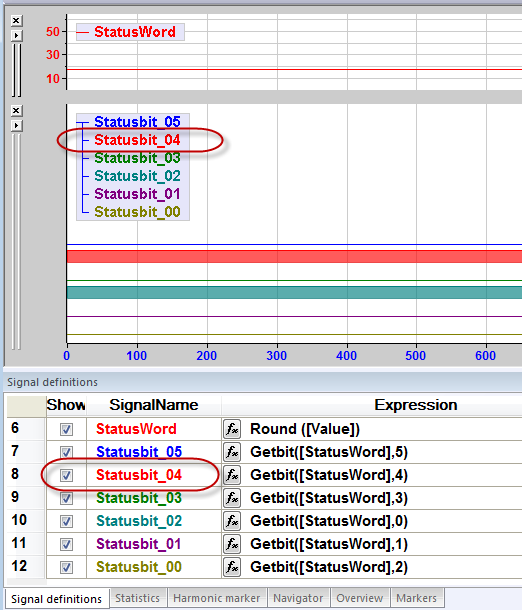
With the condition, subsequent tasks are only to be processed if a certain status
bit is set in an analysis (e.g. GetStatusbit.pdo).
Make the following settings in ibaDatCoordinator:

Since "Statusbit_04" is already a binary signal and can therefore only be TRUE or FALSE, you only need to enter the name when under Expression.
Condition without analysis file
The subsequent tasks should only be performed if the maximum value of signal [3:17] in the data file is greater than 4209.
Make the following settings in ibaDatCoordinator:

After the expression has been created, you can test it with a data file that you enter or select in the Test section, entry field DAT file. To do this, click on <?>.