Please note the following specific features when using client-server installations with regard to access by multiple clients to a server, running the service on a remote system, and the use of license extensions.
Multiple client connections
It is possible for multiple clients to connect to the same ibaDatCoordinator server. This means that several clients can change the jobs and tasks of ibaDatCoordinator on the server, but not simultaneously. If a client is connected to the server in edit mode, other clients that attempt to connect receive a message that editing by another client is blocked. In this case, you have the option of disconnecting the other client or opening your own client in read-only mode.
You cannot make any changes to the configuration in read-only mode. The header in the client is orange:

Read-only mode is also active if password protection is activated or you have entered an incorrect password.
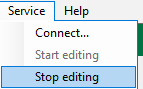
You can also switch between edit mode and read-only mode. To do this, click on Start editing or Stop editing in the menu under Service.
Executing the service on a remote system
If the service is running on a remote system, analysis files, scripts, source and target directories should be located on the remote system. When specifying a local file system path, it should be a local path on the server system. If the path leads to a shared network folder, ibaDatCoordinator converts the path to a UNC path.
If you click on the Browse button, where you can specify such paths, a dialog opens that emulates a browse dialog running on the server system. For tasks where you can specify an analysis file (on the remote system or on a network share), a copy of the analysis file is downloaded to the client system. If changes have been made, the file can be manually uploaded to the server.
License extensions
If you want to use additional functions that require a license as plugins in ibaDatCoordinator, you must install them on the server system. If you attempt to install the plugins on a system on which only the client is installed, you will receive a warning and the installation will be canceled.
When a client connects to a server for the first time, the files needed for the execution of the plugin will be transferred from the server to the client. If the client connects to another server, the already loaded plugin components might not be compatible with the version of the new server to be connected. If this is the case, ibaDatCoordinator will have to be restarted so that the plugins can be copied correctly.