With the additional Work Shift Definition time filter you can easily enable or disable a specified work shift. In this way, you reduce the displayed data to a selected time period. All defined work shifts together cover a maximum of 24 hours.

Adding or editing a work shift
-
Tap on <Add>.
To edit an already existing work shift, tap on it to select it and make the changes via <Edit>.
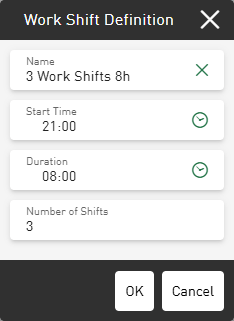
-
Enter a Name for the work shift definition, as well as Start Time, Duration and the Number of Shifts.
-
Confirm the settings with <OK>.


An additional filter field is activated on the current dashboard, which lists the available work shifts in a drop-down menu. After selecting the desired shift, the individual time periods are displayed and can be set individually or together as an active filter for this dashboard.
