You can use the Profibus Browser for choosing analog and digital signals for a “Sniffer“ or “Active slave“ module.
-
Open the Profibus browser on the General tab of the “Sniffer“ or “Active Slave“ module.
See also chapters Sniffer – General tab and Aktive slave – General tab.
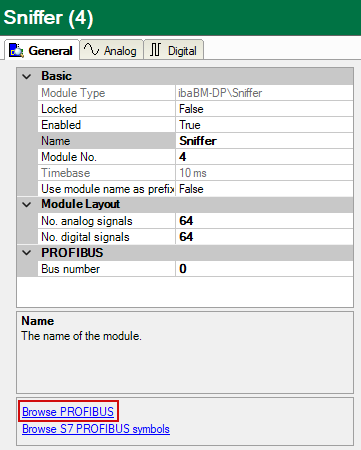
-
Then, mark the node of the participant (slave).
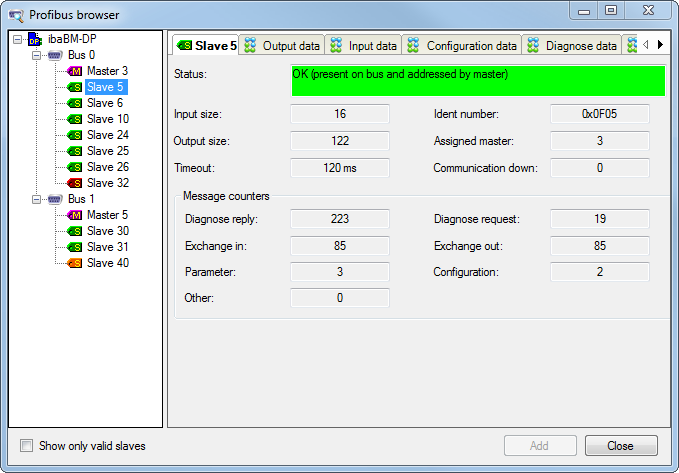
If a slave has input and/or output data, (e. g. ET200 station with input and/or output signals), the data are shown on two tabs, the Output data and the Input data tab. You can interpret the binary data by means of the Hex viewer.


In the figures above, slave no. 5 has input data and output data.
In the upper part of the tab (here, e. g. the Output data tab), the value of a chosen byte sequence is shown – interpreted for different data types – in the bottom part. You can switch between "Big Endian" and "Little Endian". If you have identified the chosen byte sequence as signal value, and want to apply it as measurement signal, mark the correct value in the upper part of the dialog. Then, you can add the signal by clicking on the <Add> button to the signal table in the Sniffer (or “Active slave“) module. Bus number, slave number, I/O, offset and data type are entered automatically. After you have added the signal, the marked choice automatically jumps to the next value of the same data type. You can also transfer a signal to the signal table by double clicking on the correct value.

