The following description refers to ibaPDA version 6.32.0 or higher. If older ibaPDA versions are use, please see chapter Compatibility mode 3Mbit with older device modules.
-
On the left-hand side in the I/O Manager, choose the desired ibaFOB-D card and mark the link, ibaBM-DP is connected to.
-
Click with the right mouse button on the link and select Autodetect.
The device set to compatibility mode 3Mbit (rotary switch S1 = 0 and S2 = 0) is identified automatically and shown as “ibaBM-DP-64” in the signal tree.
-
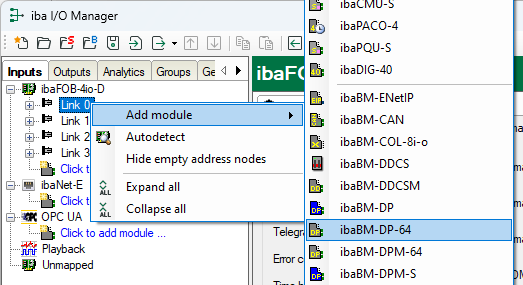
Optionally, you can also add the device manually. In this case select Add module – ibaBM-DP-64 in the context menu.
-
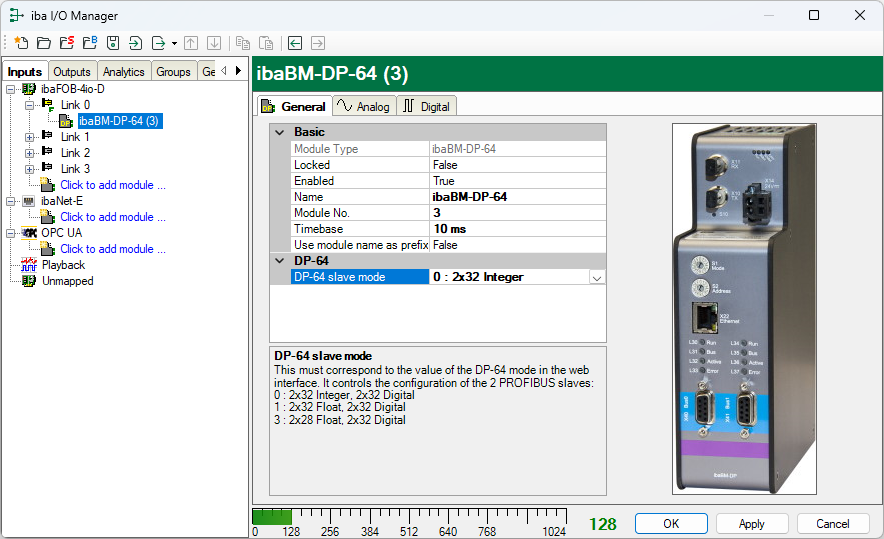
Select the operating mode in the General tab in the field DP-64.
The mode must correspond with the mode in the web interface.
-
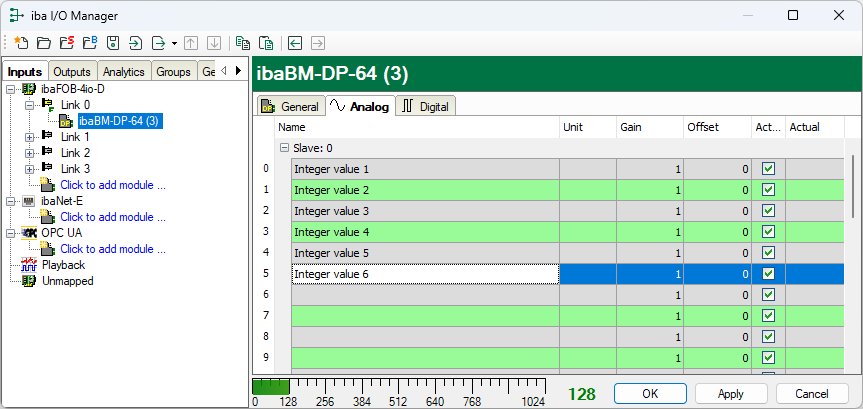
In the Analog tab, enter the signals you want to acquire in sequential order.
Enter a name for each signal (column Name) and optionally the physical unit in the column Unit. If necessary, enter values in the columns Gain and Offset for all signals.
-
Proceed accordingly for the digital signals in the Digital tab. Here, only signal names have to be entered.


