Note |
|
|---|---|
 |
The following description refers to the use of ibaBM-DP in 32Mbit Flex mode. The redundancy mode can also be used in compatibility mode 32Mbit (with ibaBM-DPM-S and with the ibaBM-DP device module). Please consider the general notes about compatibility mode 32Mbit in chapter Notes on the compatibility mode 32Mbit. |
-
Connect the ibaBM-DP device to a free link of an ibaFOB-D input card.
-
In the I/O Manager, add a device module "ibaBM-DP".
-
In the General tab, set the Redundancy mode to TRUE.
The activated redundancy mode is indicated by an orange symbol
 on the device module.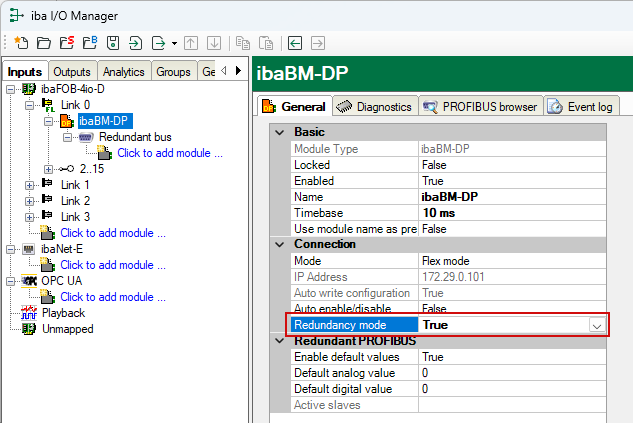
As the two bus systems 0 and 1 are operated in parallel with the redundant PROFIBUS, there are only settings for the "Redundant PROFIBUS" in the General tab.
On the left-hand side in the module tree, only a common redundant bus is displayed.
Note
Several Request modules are not available in redundancy mode: the modules "FM458 Request", "TDC Request", "Bachmann M1 Request" and the ibaCom-L2B compatible modules "S7 Request" and "S7 Request Dig512" are disabled automatically in redundancy mode.
