In compatibility mode 32Mbit, the device can be used with an “ibaBM-DP” device module in the ibaPDA configuration (I/O Manager). This mode is necessary when you want to connect an ibaBM-DP device to an ibaPDA system but cannot establish a bidirectional FO cable connection. One reason might be e. g. that you have only ibaFOB-D cards with inputs and outputs cannot be added anymore due to a lack of space.
This is why the commissioning procedure is different from the procedure described in chapter First steps for the configuration in ibaPDA.
The following prerequisites have to be met:
-
The version of ibaPDA must be V6.32.0 or higher
-
The rotary switches on the device have to be set to S1 = 1 and S2 = 0.
See chapter Device setting compatibility mode 32Mbit.
The following connections have to be established:
-
Unidirectional fiber optics connection between the transmission output TX-X10 of ibaBM-DP and a free input of an ibaFOB-D card in the ibaPDA computer.
-
For this application, ibaBM-DP has to be connected via X22 to the Ethernet network. For this purpose, you have to set an appropriate IP address.
-
Connection to the PROFIBUS network via X40 and/or X41.
Notes on the configuration in the ibaPDA I/O Manager:
-
Choose the right ibaFOB-D card and mark the link, ibaBM-DP is connected to.
-
Tap with the right mouse button on the link and select Autodetect.
The device is identified automatically and displayed in the module tree.
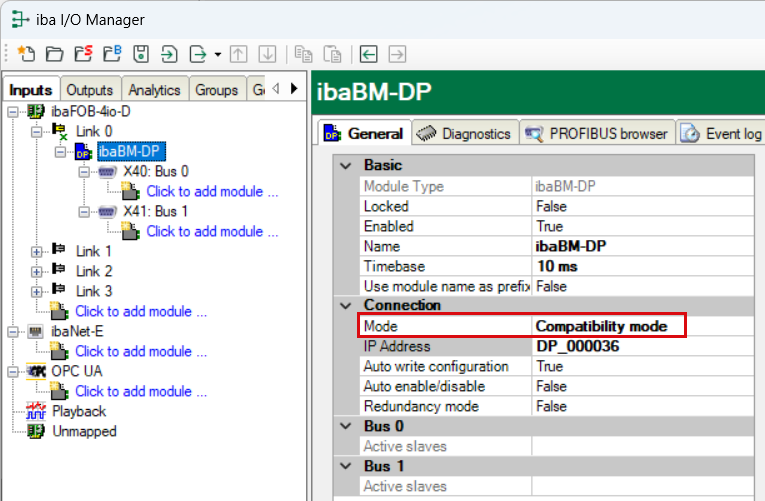
In compatibility mode 32Mbit, only one device can be operated on one link. The compatibility mode 32Mbit you have set by means of S1 = 1 and S2 = 0 is detected automatically and the device is displayed with the respective configuration.
-
Proceed as described in the chapter First steps for the configuration in ibaPDA.
