Prerequisite: Your computer is connected to ibaBM-DP via 32Mbit Flex, Ethernet or USB.
-
Start your web browser.
-
Enter one of the following URL:
If connected via …
Then URL …
32Mbit Flex
IP address, that appears in the I/O Manager of ibaPDA on the General tab in the field IP Address, when the device has been configured or detected automatically. In the example below "http://172.29.0.101"
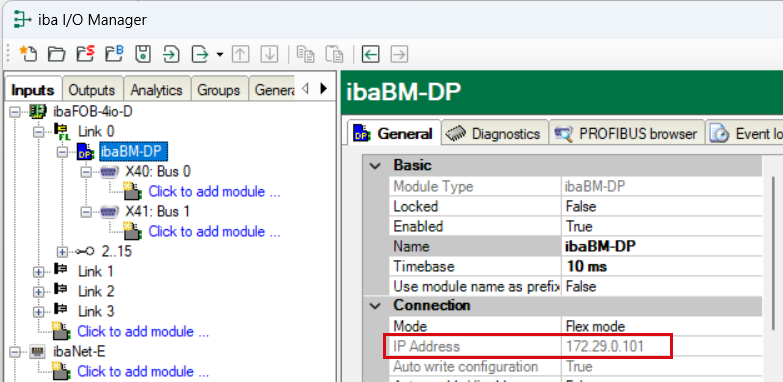
The device name cannot be resolved.
Ethernet TCP/IP interface
IP address of the device, e. g. “http://192.168.1.1”
or device name “http://dp_xxxxxx” or “http://dpms_nnnn”
USB interface
Fixed IP address of the device: “http://192.168.0.1”
The device name cannot be resolved.

Note |
|
|---|---|
 |
IP address in 32Mbit Flex mode The IP address which is assigned automatically in 32Mbit Flex mode, consists of 4 positions, e.g. 172.29.0.101. The first two positions (172.29) are equivalent to the IP address of the ibaFOB-D network adapter, the third position (0) corresponds to the number that is displayed in the display of the ibaFOB-D card in the computer + link number the device is connected to. The fourth position (101) is the device address selected on the rotary switch S2 +100. |
Tip |
|
|---|---|
 |
In case you use the Internet Explorer as browser, it might be necessary - depending on the security level of the Internet Explorer - to enter the address “http://dp_xxxxxx” or - depending on the way of access - the IP based URL as a trusted website. |
The Network, Settings and Administration pages can only be accessed by administrators and are protected by a password.

Factory settings for the user account:
|
User name |
admin |
|
Password |
1234 |
Only experienced users should have access, in order to prevent an accidental change of the settings. An unintentional change of the network parameters can have as consequence that an access to the device via Ethernet is not possible anymore and the device parameters have to be reset to the factory settings. Therefore, please change the password immediately, if possible. As characters, all numbers and letters in upper or lower case are allowed.
Tip |
|
|---|---|
|
You can reset the password together with the device settings to the factory settings, e. g. if you have forgotten a password. For further information, see chapter Push button S10 |