One or more NDBU-95 devices (DDCS branching unit) are used to distribute the DDCS telegrams. 8 drives can be connected to each NDBU-95. Up to 16 NDBU-95 devices can be cascaded.
The device ibaBM-DDCS must be connected via a unidirectional FO cable to the NDBU-95 that is also connected to the controller. To monitor all telegrams, including the response telegrams from the drives, this NDBU-95 must be operated in “REGEN” mode.

Note |
|
|---|---|
 |
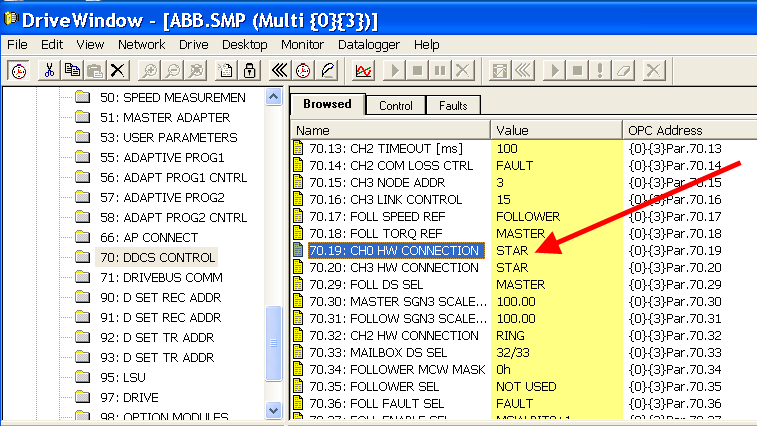
When acquiring data sets in a star topology, ensure that the connected drives are set to “Star” topology. In DriveWindow, the parameter “CH0 HW CONNECTION” in the parameter set “DDCS Control” of each drive has to be checked and set to “STAR"1
In some drives, e.g. ACC800, there are several user sets. The topology setting must be set in all used user sets. The user sets can be loaded and saved in the parameter “APPLICATION MACRO” of the set “START-UP DATA“ (z.B. Par. 99.03). |
Settings at the branching unit NDBU-95
|
Address setting (S1): Address range 76 … 124 Default: (01111100) = 0x7C |
 |
|
Operating mode selection (X13): adjust to REGEN mode. |
 |
|
Transfer rate (X12): Default setting CH0: 4 Mbit/s |
 |
ibaBM-DDCS connection to NDBU-95, REGEN mode
