If you want to use ibaBM-DDCS with ibaPDA, you have to configure the device in the ibaPDA I/O Manager.
-
Start the ibaPDA client and open the I/O Manager .
-
Select the appropriate link of the ibaFOB card to which ibaBM-DDCS is connected.
-
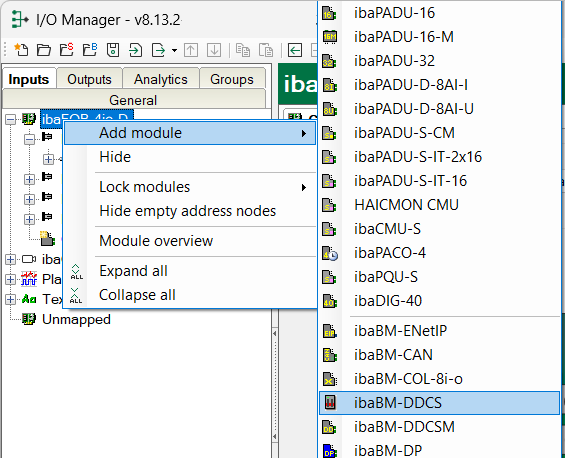
Click on the link with the right mouse button and select Add module - ibaBM-DDCS.
-
ibaBM-DDCS is now displayed below the link for your FOB-D card.
-
When the device has already been connected, select “Auto detect” in the context menu or click on the <New configuration> icon. Then, the connected devices will be automatically detected, the configured data will be read and the corresponding modules will be entered in the I/O Manager.
-
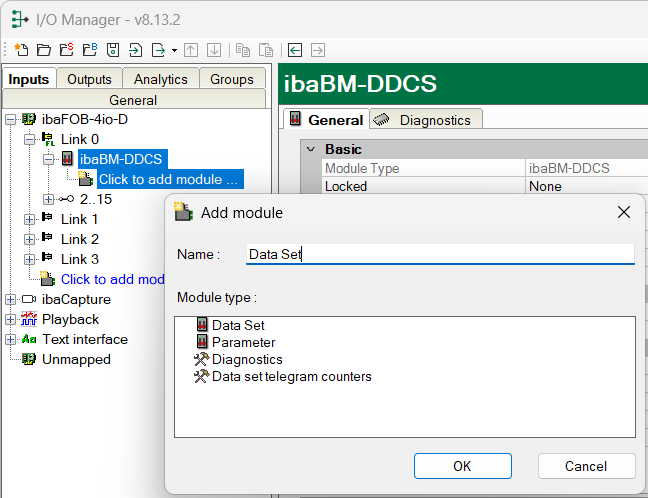
Right-click on the ibaBM-DDCS link and you can add the “Data Set,” “Parameters,” and “Diagnostics” modules. Starting with ibaPDA version 6.35, there is an additional module of the type “Data Set Telegram Counter.”